Javascript设计模式之我见:观察者模式 | 杨元超的世界
大家好!本文介绍观察者模式及其在Javascript中的应用。
模式介绍
定义
定义对象间一种一对多的依赖关系,使得每当一个对象改变状态,则所有依赖于它的对象都会得到通知并被自动更新。
类图及说明
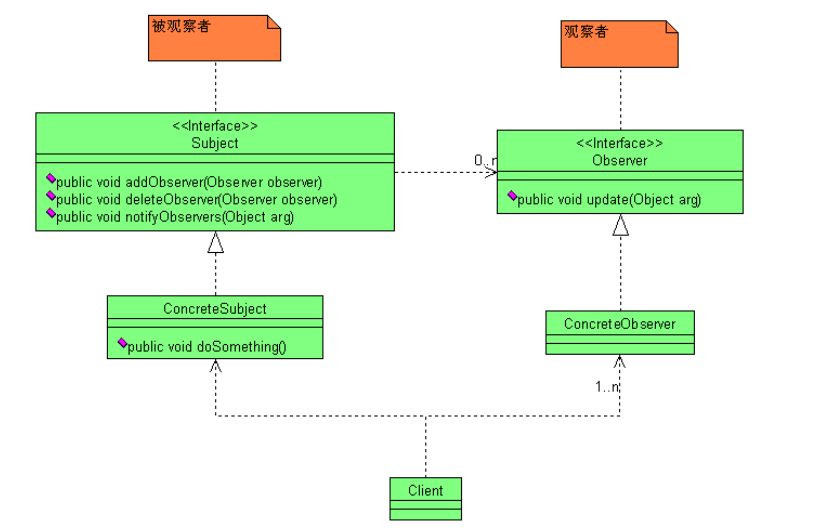
Subject:主题\发布者
能够动态地增加、取消观察者。它负责管理观察者并通知观察者。
Observer:观察者\订阅者
观察者收到消息后,即进行update操作,对接收到的信息进行处理。
ConcreteSubject:具体的主题\发布者
定义主题自己的业务逻辑,同时定义对哪些事件进行通知。
ConcreteObserver:具体的观察者\订阅者
每个观察者在接受到消息后的处理反应时不同的,各个观察者有自己的处理逻辑。
应用场景
当一个对象的改变需要同时改变其它对象,而不知道具体有多少对象有待改变。
当一个对象必须通知其它对象,而它又不能假定其它对象是谁。换言之, 你不希望这些对象是紧密耦合的。
对象仅需要将自己的更新通知给其他对象而不需要知道其他对象的细节。
优点
支持简单的广播通信,自动通知所有已经订阅过的对象。
页面载入后目标对象很容易与观察者存在一种动态关联,增加了灵活性。
目标对象与观察者之间的抽象耦合关系能够单独扩展以及重用。
缺点
1、 松偶合导致代码关系不明显,有时可能难以理解。
2、 如果一个Subject被大量Observer订阅的话,在广播通知的时候可能会有效率问题。
观察者模式在Javascript中的应用
类图及说明
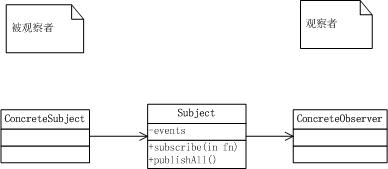
这里有两个变化:
ConcreteSubject与Subject的继承关系改为委托关系。
删除了Observer基类,直接将观察者的update方法订阅到Subject的events数组中。
应用场景
一个对象变化时触发多个对象变化
一个对象调用其他对象的方法,而又不想与之耦合
示例
现在是找工作的季节,大家都在忙着找工作。大神可以单枪匹马秒杀各种offer,高富帅也有各种关系帮忙找工作。
让我们来看下高富帅是如何找工作的。
类图

代码
GaoFuShuai
function GaoFuShuai() {
 this._wang = new Wang();
}

GaoFuShuai.prototype.findJob = function () {
 console.log("高富帅开始找工作了");
 this._wang.help();
};
王哥
 function Wang() {
 }

 Wang.prototype.help = function () {
 console.log("高富帅找工作啊,王哥来助你");
 }
场景
function main() {
 var gaofushuai = new GaoFuShuai();

 gaofushuai.findJob();
}
运行结果

分析
本设计有以下的缺点:
观察者可能不止一个,如果增加李哥、张哥等观察类,那就都要对应修改高富帅类,不符合开闭原则。
观察者可能不仅仅要观察高富帅的找工作情况,还要观察高富帅的上学、娱乐等情况,这样会有严重的耦合问题。
使用观察者模式
现在使用观察者模式来改进设计。
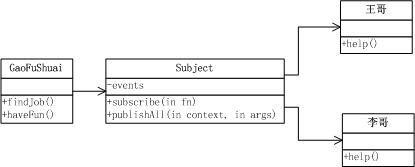
类图
代码
Subject


 (function () {
 if (!Array.prototype.forEach) {
 Array.prototype.forEach = function (fn, thisObj) {
 var scope = thisObj || window;
 for (var i = 0, j = this.length; i < j; ++i) {
 fn.call(scope, this[i], i, this);
 }
 };
 }

 if (!Array.prototype.filter) {
 Array.prototype.filter = function (fn, thisObj) {
 var scope = thisObj || window;
 var a = [];
 for (var i = 0, j = this.length; i < j; ++i) {
 if (!fn.call(scope, this[i], i, this)) {
 continue;
 }
 a.push(this[i]);
 }
 return a;
 };
 }

 var Subject = function () {
 this._events = [];
 }

 Subject.prototype = (function () {
 return {
 //订阅方法
 subscribe: function (context, fn) {
 if (arguments.length == 2) {
 this._events.push({ context: arguments[0], fn: arguments[1] });
 }
 else {
 this._events.push(arguments[0]);
 }
 },
 //发布指定方法
 publish: function (context, fn, args) {
 var args = Array.prototype.slice.call(arguments, 2); //获得函数参数
 var _context = null;
 var _fn = null;

 this._events.filter(function (el) {
 if (el.context) {
 _context = el.context;
 _fn = el.fn;
 }
 else {
 _context = context;
 _fn = el;
 }

 if (_fn === fn) {
 return _fn;
 }
 }).forEach(function (el) { //指定方法可能有多个
 el.apply(_context, args); //执行每个指定的方法
 });
 },
 unSubscribe: function (fn) {
 var _fn = null;
 this._events = this._events.filter(function (el) {
 if (el.fn) {
 _fn = el.fn;
 }
 else {
 _fn = el;
 }

 if (_fn !== fn) {
 return el;
 }
 });
 },
 //全部发布
 publishAll: function (context, args) {
 var args = Array.prototype.slice.call(arguments, 1); //获得函数参数
 var _context = null;
 var _fn = null;

 this._events.forEach(function (el) {
 if (el.context) {
 _context = el.context;
 _fn = el.fn;
 }
 else {
 _context = context;
 _fn = el;
 }

 _fn.apply(_context, args); //执行每个指定的方法
 });
 },
 dispose: function () {
 this._events = [];
 }
 }
 })();

 window.Subject = Subject;
 })();
View Code
GaoFuShuai
function GaoFuShuai() {
}

GaoFuShuai.prototype.findJob = function () {
 console.log("高富帅开始找工作了");
 window.subject.publishAll(null, "帮忙找工作");
};
GaoFuShuai.prototype.haveFun = function () {
 console.log("高富帅开始娱乐了");
 window.subject.publishAll(null, "帮忙找乐子");
};
王哥
function Wang() {
}

Wang.prototype.help = function (actionStr) {
 console.log("王哥" + actionStr);
};
李哥
function Li() {
}

Li.prototype.help = function (actionStr) {
 console.log("李哥" + actionStr);
};
场景
function main() {
 var wang = new Wang(),
 li = new Li(),
 gaofushuai = new GaoFuShuai();

 window.subject = new Subject();
 window.subject.subscribe(wang.help);
 window.subject.subscribe(li.help);

 gaofushuai.findJob();
 gaofushuai.haveFun();
}
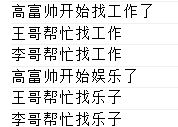
运行结果
分析
这样就符合开闭原则了,被观察者与观察者也不再直接耦合了。如果想继续增加观察者,则只需对应修改main即可,被观察者GaoFuShuai类不用修改。
参考资料
[深入理解JavaScript系列(32):设计模式之观察者模式
](http://www.cnblogs.com/TomXu/archive/2012/03/02/2355128.html)《设计模式之禅》