炸弹人游戏开发系列(7):加入敌人,使用A*算法寻路 | 杨元超的世界
前言
上文中我们实现了炸弹人与墙的碰撞检测,以及设置移动步长来解决发现的问题。本文会加入1个AI敌人,敌人使用A*算法追踪炸弹人。
本文目的
加入敌人,追踪炸弹人
本文主要内容
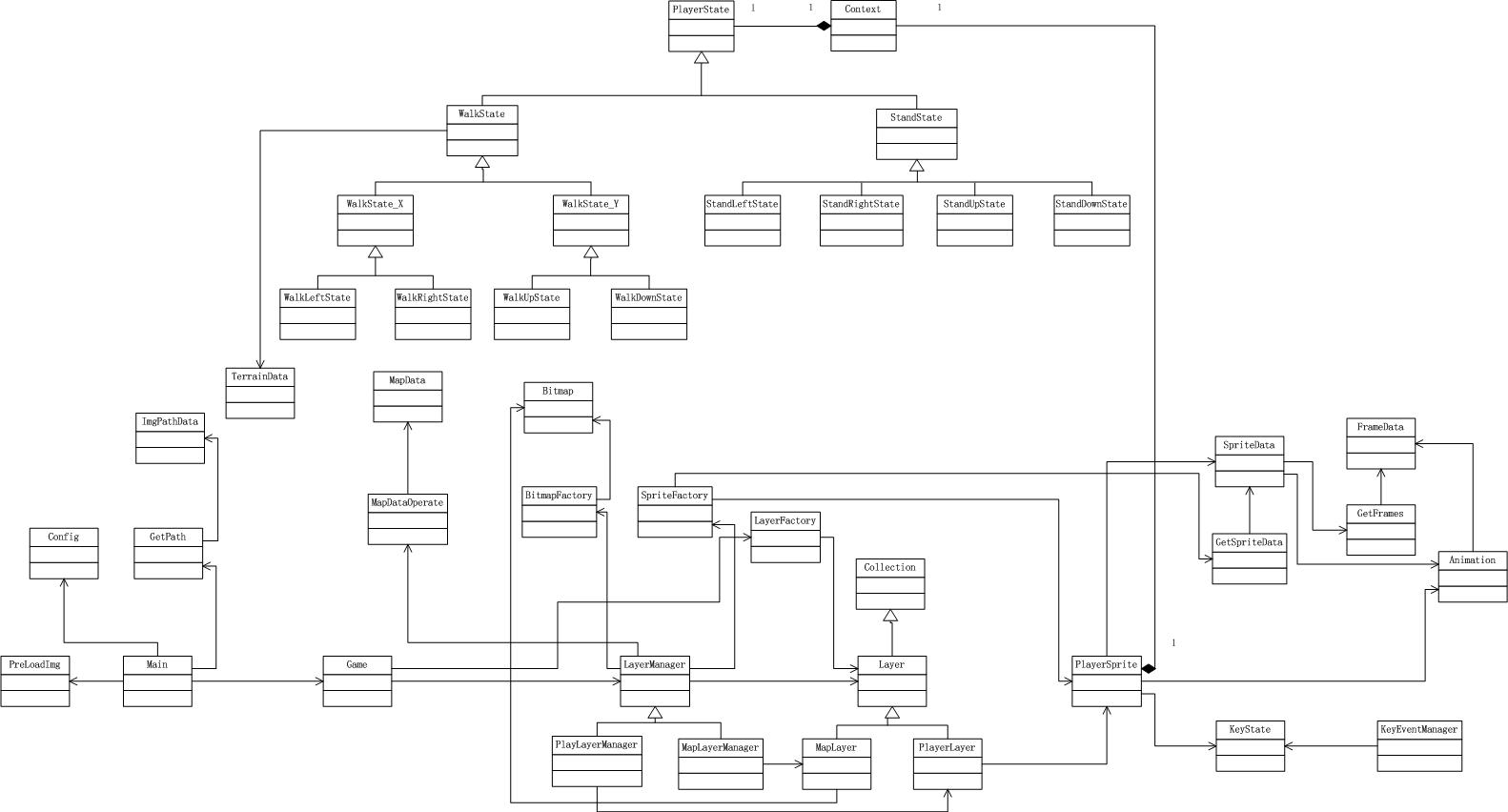
回顾上文更新后的领域模型
开发策略
首先实现“加入敌人”功能。通过参考“炸弹人游戏开发系列(4):炸弹人显示与移动“中的实现,可以初步分析出需要加入敌人图片、敌人帧数据和精灵数据、敌人精灵类EnemySprite、敌人层EnemyLayer和敌人层管理类EnemyLayerManager。
然后实现“追踪炸弹人”功能。需要新建一个算法类FindPath,负责使用A*算法计算并返回路径数据。
敌人精灵类与算法类的交互关系:

并行开发
可以并行开发“加入敌人”和“追踪炸弹人”。
先定义一个FindPath类的的接口,指定findPath方法输入参数和返回参数的格式。
实现“加入敌人”功能时,可以按照接口指定的格式使用假的路径数据来测试EnemySprite类;实现“追踪炸弹人”功能时,按照接口指定格式使用假的坐标数据来测试FindPath类。
在EnemySprit和FindPath都实现后,再集成在一起测试。因为两者接口一致,因此集成时不会有什么困难。
加入敌人
扩大地图
现在地图大小为4*4,太小了。
加入一个敌人后:
可玩性太低 很快游戏就结束了;玩家操作炸弹人躲避敌人的空间太小了。
不方便演示和测试游戏 由于游戏很快就结束,因此不方便演示和测试游戏。
因此,将地图扩大为20*20。
要实现这个功能,只需要修改MapData和TerrainData即可。
相关代码
MapData


//地图数据
(function () {
 var ground = bomberConfig.map.type.GROUND,
 wall = bomberConfig.map.type.WALL;

 var mapData = [
 [
 wall, ground, ground, ground, ground,
 ground, ground, ground, ground, ground,
 ground, ground, ground, ground, ground,
 ground, ground, ground, ground, ground
 ],
 [
 wall, ground, wall, wall, wall,
 wall, wall, wall, ground, ground,
 ground, ground, ground, ground, ground,
 ground, ground, ground, ground, ground
 ],
 [
 wall, ground, ground, ground, wall,
 ground, ground, wall, wall, ground,
 ground, ground, ground, wall, ground,
 ground, ground, ground, ground, ground
 ],
 [
 wall, ground, ground, ground, wall,
 ground, ground, wall, wall, wall,
 ground, wall, ground, wall, ground,
 ground, ground, ground, ground, ground
 ],
 [
 wall, ground, ground, ground, wall,
 ground, ground, ground, ground, ground,
 ground, ground, ground, ground, ground,
 ground, ground, ground, ground, ground
 ],


 [
 wall, ground, wall, ground, ground,
 ground, ground, ground, ground, ground,
 ground, ground, ground, ground, ground,
 ground, ground, ground, ground, ground
 ],
 [
 wall, ground, ground, ground, wall,
 ground, ground, ground, ground, ground,
 ground, ground, ground, ground, ground,
 ground, ground, ground, ground, ground
 ],
 [
 wall, ground, ground, ground, wall,
 ground, ground, ground, ground, ground,
 ground, ground, ground, ground, ground,
 ground, ground, ground, ground, ground
 ],
 [
 wall, ground, ground, ground, wall,
 ground, ground, ground, ground, ground,
 ground, ground, ground, ground, ground,
 ground, ground, ground, ground, ground
 ],
 [
 wall, ground, ground, ground, wall,
 ground, ground, ground, ground, ground,
 ground, ground, ground, ground, ground,
 ground, ground, ground, ground, ground
 ],

 [
 wall, ground, ground, ground, wall,
 ground, ground, ground, ground, ground,
 ground, ground, ground, ground, ground,
 ground, ground, ground, ground, ground
 ],
 [
 wall, ground, ground, ground, wall,
 ground, ground, ground, ground, ground,
 ground, ground, ground, ground, ground,
 ground, ground, ground, ground, ground
 ],
 [
 wall, ground, ground, ground, wall,
 ground, ground, ground, ground, ground,
 ground, ground, ground, ground, ground,
 ground, ground, ground, ground, ground
 ],
 [
 wall, ground, ground, ground, wall,
 ground, ground, ground, ground, ground,
 ground, ground, ground, ground, ground,
 ground, ground, ground, ground, ground
 ],
 [
 wall, ground, ground, ground, wall,
 ground, ground, ground, ground, ground,
 ground, ground, ground, ground, ground,
 ground, ground, ground, ground, ground
 ],


 [
 wall, ground, ground, ground, wall,
 ground, ground, ground, ground, ground,
 ground, ground, ground, ground, ground,
 ground, ground, ground, ground, ground
 ],
 [
 wall, ground, ground, ground, wall,
 ground, ground, ground, ground, ground,
 ground, ground, ground, ground, ground,
 ground, ground, ground, ground, ground
 ],
 [
 wall, ground, ground, ground, wall,
 ground, ground, ground, ground, ground,
 ground, ground, ground, ground, ground,
 ground, ground, ground, ground, ground
 ],
 [
 wall, ground, ground, ground, wall,
 ground, ground, ground, ground, ground,
 ground, ground, ground, ground, ground,
 ground, ground, ground, ground, ground
 ],
 [
 wall, ground, ground, ground, wall,
 ground, ground, ground, ground, ground,
 ground, ground, ground, ground, ground,
 ground, ground, ground, ground, ground
 ]
 ];

 window.mapData = mapData;
}());
View Code
TerrainData
(function () {
 var pass = bomberConfig.map.terrain.pass,
 stop = bomberConfig.map.terrain.stop;

 var terrainData = [
 [
 stop, pass, pass, pass, pass,
 pass, pass, pass, pass, pass,
 pass, pass, pass, pass, pass,
 pass, pass, pass, pass, pass
 ],
 [
 stop, pass, stop, stop, stop,
 stop, stop, stop, pass, pass,
 pass, pass, pass, pass, pass,
 pass, pass, pass, pass, pass
 ],
 [
 stop, pass, pass, pass, stop,
 pass, pass, stop, stop, pass,
 pass, pass, pass, stop, pass,
 pass, pass, pass, pass, pass
 ],
 [
 stop, pass, pass, pass, stop,
 pass, pass, stop, stop, stop,
 pass, stop, pass, stop, pass,
 pass, pass, pass, pass, pass
 ],
 [
 stop, pass, pass, pass, stop,
 pass, pass, pass, pass, pass,
 pass, pass, pass, pass, pass,
 pass, pass, pass, pass, pass
 ],


 [
 stop, pass, stop, pass, pass,
 pass, pass, pass, pass, pass,
 pass, pass, pass, pass, pass,
 pass, pass, pass, pass, pass
 ],
 [
 stop, pass, pass, pass, stop,
 pass, pass, pass, pass, pass,
 pass, pass, pass, pass, pass,
 pass, pass, pass, pass, pass
 ],
 [
 stop, pass, pass, pass, stop,
 pass, pass, pass, pass, pass,
 pass, pass, pass, pass, pass,
 pass, pass, pass, pass, pass
 ],
 [
 stop, pass, pass, pass, stop,
 pass, pass, pass, pass, pass,
 pass, pass, pass, pass, pass,
 pass, pass, pass, pass, pass
 ],
 [
 stop, pass, pass, pass, stop,
 pass, pass, pass, pass, pass,
 pass, pass, pass, pass, pass,
 pass, pass, pass, pass, pass
 ],

 [
 stop, pass, pass, pass, stop,
 pass, pass, pass, pass, pass,
 pass, pass, pass, pass, pass,
 pass, pass, pass, pass, pass
 ],
 [
 stop, pass, pass, pass, stop,
 pass, pass, pass, pass, pass,
 pass, pass, pass, pass, pass,
 pass, pass, pass, pass, pass
 ],
 [
 stop, pass, pass, pass, stop,
 pass, pass, pass, pass, pass,
 pass, pass, pass, pass, pass,
 pass, pass, pass, pass, pass
 ],
 [
 stop, pass, pass, pass, stop,
 pass, pass, pass, pass, pass,
 pass, pass, pass, pass, pass,
 pass, pass, pass, pass, pass
 ],
 [
 stop, pass, pass, pass, stop,
 pass, pass, pass, pass, pass,
 pass, pass, pass, pass, pass,
 pass, pass, pass, pass, pass
 ],


 [
 stop, pass, pass, pass, stop,
 pass, pass, pass, pass, pass,
 pass, pass, pass, pass, pass,
 pass, pass, pass, pass, pass
 ],
 [
 stop, pass, pass, pass, stop,
 pass, pass, pass, pass, pass,
 pass, pass, pass, pass, pass,
 pass, pass, pass, pass, pass
 ],
 [
 stop, pass, pass, pass, stop,
 pass, pass, pass, pass, pass,
 pass, pass, pass, pass, pass,
 pass, pass, pass, pass, pass
 ],
 [
 stop, pass, pass, pass, stop,
 pass, pass, pass, pass, pass,
 pass, pass, pass, pass, pass,
 pass, pass, pass, pass, pass
 ],
 [
 stop, pass, pass, pass, stop,
 pass, pass, pass, pass, pass,
 pass, pass, pass, pass, pass,
 pass, pass, pass, pass, pass
 ]
 ];

 window.terrainData = terrainData;
}());
View Code
加入敌人图片和数据
首先加入敌人的精灵图片

然后加入敌人帧动画数据类
(function () {
 var getEnemyFrames = (function () {
 //一个动作在图片中的宽度
 var width = bomberConfig.enemy.WIDTH,
 //一个动作在图片中的高度
 height = bomberConfig.enemy.HEIGHT,
 //一个动作的偏移量
 offset = {
 x: bomberConfig.enemy.offset.X,
 y: bomberConfig.enemy.offset.Y
 },
 //一个动作横向截取的长度
 sw = bomberConfig.enemy.SW,
 //一个动作纵向截取的长度
 sh = bomberConfig.enemy.SH,
 //一个动作图片在canvas中的宽度
 imgWidth = bomberConfig.enemy.IMGWIDTH,
 //一个动作图片在canvas中的高度
 imgHeight = bomberConfig.enemy.IMGHEIGHT;

 //帧数据
 var frames = function () {
 return {
 //向右站立
 stand_right: {
 img: window.imgLoader.get("enemy"),
 frames: [
 { x: offset.x, y: offset.y + 2 * height, width: sw, height: sh, imgWidth: imgWidth, imgHeight: imgHeight, duration: 100 }
 ]
 },
 //向左站立
 stand_left: {
 img: window.imgLoader.get("enemy"),
 frames: [
 { x: offset.x, y: offset.y + height, width: sw, height: sh, imgWidth: imgWidth, imgHeight: imgHeight, duration: 100 }
 ]
 },
 //向上站立
 stand_up: {
 img: window.imgLoader.get("enemy"),
 frames: [
 { x: offset.x, y: offset.y + 3 * height, width: sw, height: sh, imgWidth: imgWidth, imgHeight: imgHeight, duration: 100 }
 ]
 },
 //向下站立
 stand_down: {
 img: window.imgLoader.get("enemy"),
 frames: [
 { x: offset.x, y: offset.y, width: sw, height: sh, imgWidth: imgWidth, imgHeight: imgHeight, duration: 100 }
 ]
 },
 //向上走
 walk_up: {
 img: window.imgLoader.get("enemy"),
 frames: [
 { x: offset.x, y: offset.y + 3 * height, width: sw, height: sh, imgWidth: imgWidth, imgHeight: imgHeight, duration: 100 },
 { x: offset.x + width, y: offset.y + 3 * height, width: sw, height: sh, imgWidth: imgWidth, imgHeight: imgHeight, duration: 100 },
 { x: offset.x + 2 * width, y: offset.y + 3 * height, width: sw, height: sh, imgWidth: imgWidth, imgHeight: imgHeight, duration: 100 },
 { x: offset.x + 3 * width, y: offset.y + 3 * height, width: sw, height: sh, imgWidth: imgWidth, imgHeight: imgHeight, duration: 100 }
 ]
 },
 //向下走
 walk_down: {
 img: window.imgLoader.get("enemy"),
 frames: [
 { x: offset.x, y: offset.y, width: sw, height: sh, imgWidth: imgWidth, imgHeight: imgHeight, duration: 100 },
 { x: offset.x + width, y: offset.y, width: sw, height: sh, imgWidth: imgWidth, imgHeight: imgHeight, duration: 100 },
 { x: offset.x + 2 * width, y: offset.y, width: sw, height: sh, imgWidth: imgWidth, imgHeight: imgHeight, duration: 100 },
 { x: offset.x + 3 * width, y: offset.y, width: sw, height: sh, imgWidth: imgWidth, imgHeight: imgHeight, duration: 100 }
 ]
 },
 //向右走
 walk_right: {
 img: window.imgLoader.get("enemy"),
 frames: [
 { x: offset.x, y: offset.y + 2 * height, width: sw, height: sh, imgWidth: imgWidth, imgHeight: imgHeight, duration: 100 },
 { x: offset.x + width, y: offset.y + 2 * height, width: sw, height: sh, imgWidth: imgWidth, imgHeight: imgHeight, duration: 100 },
 { x: offset.x + 2 * width, y: offset.y + 2 * height, width: sw, height: sh, imgWidth: imgWidth, imgHeight: imgHeight, duration: 100 },
 { x: offset.x + 3 * width, y: offset.y + 2 * height, width: sw, height: sh, imgWidth: imgWidth, imgHeight: imgHeight, duration: 100 }
 ]
 },
 //向左走
 walk_left: {
 img: window.imgLoader.get("enemy"),
 frames: [
 { x: offset.x, y: offset.y + height, width: sw, height: sh, imgWidth: imgWidth, imgHeight: imgHeight, duration: 100 },
 { x: offset.x + width, y: offset.y + height, width: sw, height: sh, imgWidth: imgWidth, imgHeight: imgHeight, duration: 100 },
 { x: offset.x + 2 * width, y: offset.y + height, width: sw, height: sh, imgWidth: imgWidth, imgHeight: imgHeight, duration: 100 },
 { x: offset.x + 3 * width, y: offset.y + height, width: sw, height: sh, imgWidth: imgWidth, imgHeight: imgHeight, duration: 100 }
 ]
 }
 }
 }

 return function (animName) {
 return frames()[animName];
 };
 }());

 window.getEnemyFrames = getEnemyFrames;
}());
View Code
然后加入敌人精灵类数据
(function () {
 var getSpriteData = (function () {
 var data = function(){
 return {
...
 //敌人精灵类
 enemy: {
 //初始坐标
 x: bomberConfig.WIDTH * 10,
 //x: 0,
 y: bomberConfig.HEIGHT * 3,
 //定义sprite走路速度的绝对值
 walkSpeed: bomberConfig.enemy.speed.NORMAL,

 //速度
 speedX: 1,
 speedY: 1,

 //注意坐标起始点为图片左上点!

 minX: 0,
 maxX: bomberConfig.canvas.WIDTH - bomberConfig.player.IMGWIDTH,
 //maxX: 500,
 minY: 0,
 maxY: bomberConfig.canvas.HEIGHT - bomberConfig.player.IMGHEIGHT,


 defaultAnimId: "stand_left",

 anims: {
 "stand_right": new Animation(getEnemyFrames("stand_right")),
 "stand_left": new Animation(getEnemyFrames("stand_left")),
 "stand_down": new Animation(getEnemyFrames("stand_down")),
 "stand_up": new Animation(getEnemyFrames("stand_up")),
 "walk_up": new Animation(getEnemyFrames("walk_up")),
 "walk_down": new Animation(getEnemyFrames("walk_down")),
 "walk_right": new Animation(getEnemyFrames("walk_right")),
 "walk_left": new Animation(getEnemyFrames("walk_left"))
 }
 }
 }
 };

 return function (spriteName) {
 return data()[spriteName];
 };
 }());

 window.getSpriteData = getSpriteData;
}());
加入EnemySprite类
增加敌人精灵类。
创建假的A*算法类FindPath类
创建返回假数据的FindPath类,用于测试EnemySprite类。
相关代码
FindPath
(function () {
 //构造假数据
 var findPath = {
 aCompute: function (terrainData, begin, target) {
 return {
 path: [{ x: 8, y: 0 }, { x: 7, y: 0 }, { x: 6, y: 0 }, { x: 5, y: 0 }, { x: 4, y: 0 }],
 time: 0.1
 };
 }
 };

 window.findPath = findPath;
}());
EnemySprite
(function () {
var EnemySprite = YYC.Class({
Init: function (data) {
//初始坐标
this.x = data.x;
this.y = data.y;
this.speedX = data.speedX;
this.speedY = data.speedY;
//x/y坐标的最大值和最小值, 可用来限定移动范围.
this.minX = data.minX;
this.maxX = data.maxX;
this.minY = data.minY;
this.maxY = data.maxY;
this.defaultAnimId = data.defaultAnimId;
this.anims = data.anims;
this.walkSpeed = data.walkSpeed;
this.speedX = data.walkSpeed;
this.speedY = data.walkSpeed;
this._context = new Context(this);
},
Private: {
//状态模式上下文类
__context: null,
//更新帧动画
_updateFrame: function (deltaTime) {
if (this.currentAnim) {
this.currentAnim.update(deltaTime);
}
},
_computeCoordinate: function () {
this.x = this.x + this.speedX * this.dirX;
this.y = this.y + this.speedY * this.dirY;
//因为移动次数是向上取整,可能会造成移动次数偏多(如stepX为2.5,取整则stepX为3),
//坐标可能会偏大(大于bomberConfig.WIDTH / bomberConfig.HEIGHT的整数倍),
//因此此处需要向下取整。
//x、y为bomberConfig.WIDTH/bomberConfig.HEIGHT的整数倍(向下取整)
if (this.completeOneMove) {
this.x -= this.x % bomberConfig.WIDTH;
this.y -= this.y % bomberConfig.HEIGHT;
}
},
__getCurrentState: function () {
var currentState = null;
switch (this.defaultAnimId) {
case "stand_right":
currentState = new StandRightState();
break;
case "stand_left":
currentState = new StandLeftState;
break;
case "stand_down":
currentState = new StandDownState;
break;
case "stand_up":
currentState = new StandUpState;
break;
case "walk_down":
currentState = new WalkDownState;
break;
case "walk_up":
currentState = new WalkUpState;
break;
case "walk_right":
currentState = new WalkRightState;
break;
case "walk_left":
currentState = new WalkLeftState;
break;
default:
throw new Error("未知的状态");
break;
}
;
return currentState;
},
//计算移动次数
__computeStep: function () {
this.stepX = Math.ceil(bomberConfig.WIDTH / this.speedX);
this.stepY = Math.ceil(bomberConfig.HEIGHT / this.speedY);
}
},
Public: {
//精灵的坐标
x: 0,
y: 0,
//精灵的速度
speedX: 0,
speedY: 0,
//精灵的坐标区间
minX: 0,
maxX: 9999,
minY: 0,
maxY: 9999,
//精灵包含的所有 Animation 集合. Object类型, 数据存放方式为" id : animation ".
anims: null,
//默认的Animation的Id , string类型
defaultAnimId: null,
//当前的Animation.
currentAnim: null,
//精灵的方向系数:
//往下走dirY为正数,往上走dirY为负数;
//往右走dirX为正数,往左走dirX为负数。
dirX: 0,
dirY: 0,
//定义sprite走路速度的绝对值
walkSpeed: 0,
//一次移动步长中的需要移动的次数
stepX: 0,
stepY: 0,
//一次移动步长中已经移动的次数
moveIndex_x: 0,
moveIndex_y: 0,
//是否正在移动标志
moving: false,
//站立标志
//用于解决调用WalkState.stand后,PlayerLayer.render中P__isChange返回false的问题
//(不调用draw,从而仍会显示精灵类walk的帧(而不会刷新为更新状态后的精灵类stand的帧))。
stand: false,
//寻找的路径
path: null,
//设置当前Animation, 参数为Animation的id, String类型
setAnim: function (animId) {
this.currentAnim = this.anims[animId];
},
init: function () {
this.__context.setPlayerState(this.__getCurrentState());
this.__computeStep();
this.path = window.findPath.aCompute().path;
//设置当前Animation
this.setAnim(this.defaultAnimId);
},
// 更新精灵当前状态
update: function (deltaTime) {
this._updateFrame(deltaTime);
},
draw: function (context) {
var frame = null;
if (this.currentAnim) {
frame = this.currentAnim.getCurrentFrame();
context.drawImage(this.currentAnim.getImg(), frame.x, frame.y, frame.width, frame.height, this.x, this.y, frame.imgWidth, frame.imgHeight);
}
},
clear: function (context) {
var frame = null;
if (this.currentAnim) {
frame = this.currentAnim.getCurrentFrame();
//直接清空画布区域
context.clearRect(0, 0, bomberConfig.canvas.WIDTH, bomberConfig.canvas.HEIGHT);
}
},
move: function () {
this.__context.move();
},
setDir: function () {
if (this.moving) {
return;
}
//返回并移除要移动到的坐标
var target = this.path.shift();
//当前坐标
var now = {
x: self.x / bomberConfig.WIDTH,
y: self.y / bomberConfig.HEIGHT
};
//判断要移动的方向,调用相应的方法
if (target.x > now.x) {
this.__context.walkRight();
}
else if (target.x now.y) {
this.__context.walkDown();
}
else if (target.y
**实现寻路算法**
游戏中的敌人采用A*算法寻路。参考资料:[A星算法](http://hi.baidu.com/wsapyoemdfacmqr/item/bdfb5c0a74c904d01ef0466d)
# 敌人寻路模式
游戏开始时,敌人以它的当前位置为起始点,炸弹人的位置为终点寻路。如果敌人到达终点后,没有碰撞到炸弹人,则再一次以它的当前位置为起始点,炸弹人的位置为终点寻路。
# 敌人寻路流程

# 实现FindPath类
## 领域模型

## 相关代码
FindPath

(function () { var map_w, beginx, beginy, endx, endy; var arr_path_out = new Array();
var pass = bomberConfig.map.terrain.pass, stop = bomberConfig.map.terrain.stop;
var arr_map = new Array(); var open_list = new Array(); //创建OpenList var close_list = new Array(); //创建CloseList var tmp = new Array(); //存放当前节点的八个方向的节点 var arr_map_tmp = window.mapData; //存储从游戏中读入的地图数据 var map_w = arr_map_tmp.length;
function aCompute(mapData, begin, end) { //计算运行时间 var startTime, endTime; var d = new Date(); var time; startTime = d.getTime();
var arr_path = new Array(); var stopn = 0;
/函数主体部分*****/
arr_map = setMap(mapData);
map_w = mapData.length; beginx = begin.x; beginy = map_w - 1 - begin.y; endx = end.x; endy = map_w - 1 - end.y; var startNodeNum = tile_num(beginx, beginy); var targetNodeNum = tile_num(endx, endy);
if (arr_map[targetNodeNum] && arr_map[targetNodeNum][0] == 0) { showError("目的地无法到达!"); time = getTime(startTime); return { path: [], time: time }; } if (arr_map[startNodeNum][0] == 0) { showError("起始点不可用!"); time = getTime(startTime); return { path: [], time: time }; }
if (arr_map[targetNodeNum] && arr_map[targetNodeNum][0] * arr_map[startNodeNum][0] == 1) { arr_map[startNodeNum] = [arr_map[startNodeNum][0], startNodeNum, arr_map[startNodeNum][2], arr_map[startNodeNum][3], arr_map[startNodeNum][4]];//起始点的父节点为自己 setH(targetNodeNum); setOpenList(startNodeNum); //把开始节点加入到openlist中 //就要开始那个令人发指的循环了,==!!A*算法主体
while (open_list.length != 0) { var bestNodeNum = selectFmin(open_list); stopn = 0; open_list.shift(); setCloseList(bestNodeNum);
if (bestNodeNum == targetNodeNum) { showPath(close_list, arr_path); break; } var i = 0, j = 0; //当目标为孤岛时的判断 var tmp0 = new Array(); var k; tmp0 = setSuccessorNode(targetNodeNum, map_w); for (j; j = (arr_map[bestNodeNum][2] + cost(tmp[i], bestNodeNum))) { setG(tmp[i][4], bestNodeNum); //算g值,修改arr_map中[2]的值 arr_map[tmp[i][4]] = tmp[i] = [arr_map[tmp[i][4]][0], bestNodeNum, arr_map[tmp[i][4]][2], arr_map[tmp[i][4]][3], arr_map[tmp[i][4]][4]]; //修改tmp和arr_map中父节点的值,并修改tmp中g值,是之和arr_map中对应节点的值统一 } } if (findInOpenList(tmp[i][4]) == 0) { setG(tmp[i][4], bestNodeNum); //算g值,修改arr_map中[2]的值 arr_map[tmp[i][4]] = tmp[i] = [arr_map[tmp[i][4]][0], bestNodeNum, arr_map[tmp[i][4]][2], arr_map[tmp[i][4]][3], arr_map[tmp[i][4]][4]]; //修改tmp和arr_map中父节点的值,并修改tmp中g值,是之和arr_map中对应节点的值统一 setOpenList(tmp[i][4]); //存进openlist中
} } }
stopn++; //if (stopn == map_w * map_w - 1) { //2013.5.27修改 if (stopn == map_w * map_w * 1000) { showError("找不到路径!"); time = getTime(startTime); return { path: [], time: time };
// break; } }
if (open_list.length == 0 && bestNodeNum != targetNodeNum) { showError("没有找到路径!!"); //对于那种找不到路径的点的处理 time = getTime(startTime); return { path: [], time: time }; } }
time = getTime(startTime);
return { path: arr_path_out, time: time };
}
function getTime(startTime) { /显示运行时间*****/ var endTime = new Date().getTime(); return (endTime - startTime) / 1000; };
function showError(error) { console.log(error); };
/********************************************************************** *function setMap(n) *功能:把外部的地图数据抽象成该算法中可操作数组的形式来输入算法 *参数:n为地图的宽度,生成方阵地图 ************************************************************************/ function setMap(mapData) {
map_w = mapData.length; var m = map_w * map_w;
var arr_map0 = new Array(); //该函数对地图数据转换的操作数组 var a = m - 1; for (a; a >= 0; a--) { var xTmp = tile_x(a); //把ID 编号值转换为x坐标值,用来对应读入地图数据 var yTmp = map_w - 1 - tile_y(a); //把ID 编号值转换为y坐标值,用来对应读入地图数据,对应数组标号和我自定义xoy坐标位置
//[cost,parent,g,h,id] if (mapData[yTmp][xTmp] == pass) arr_map0[a] = [1, 0, 0, 0, a]; else arr_map0[a] = [0, 0, 0, 0, a];
}
return arr_map0; }
/********************************************************************* *以下三个函数是地图上的编号与数组索引转换 *function tile_num(x,y) *功能:将 x,y 坐标转换为地图上块的编号 *function tile_x(n) *功能:由块编号得出 x 坐标 *function tile_y(n) *功能:由块编号得出 y 坐标 ******************************************************************/ function tile_num(x, y) { return ((y) * map_w + (x)); }
function tile_x(n) { return (parseInt((n) % map_w)); }
function tile_y(n) { return (parseInt((n) / map_w)); }
/********************************************************************* *function setH(targetNode) *功能:初始化所有点H的值 *参数:targetNode目标节点 **********************************************************************/ function setH(targetNode) {
var x0 = tile_x(targetNode); var y0 = tile_y(targetNode); var i = 0; for (i; i (open_list[j][2] + open_list[j][3])) { temp = open_list[i]; open_list[i] = open_list[j]; open_list[j] = temp; } } } var min = open_list[0]; return min[4]; }
/*********************************************************************** *function setOpenList(NodeNum) *功能:把节点加入open表中 *参数:待加入openlist的节点的编号 ************************************************************************/ function setOpenList(NodeNum) { var n = open_list.length; open_list[n] = [arr_map[NodeNum][0], arr_map[NodeNum][1], arr_map[NodeNum][2], arr_map[NodeNum][3], arr_map[NodeNum][4]]; }
/*********************************************************************** *function setCloseList(NodeNum) *功能:把节点加入close表中 *参数:待加入closelist的节点的编号 ************************************************************************/ function setCloseList(NodeNum) { var n = close_list.length; close_list[n] = [arr_map[NodeNum][0], arr_map[NodeNum][1], arr_map[NodeNum][2], arr_map[NodeNum][3], arr_map[NodeNum][4]]; }
/*********************************************************************** *function findInOpenList(nowNodeNum) *功能:查询当前节点是否在openlist中,找到返回1,找不到返回0 *参数:待查询的节点的编号 ************************************************************************/ function findInOpenList(nowNodeNum) { var i; for (i = 0; i = 0 && (y0) >= 0 && (x0 - 1) = 0 && (y0 + 1) >= 0 && (x0) = 0 && (y0 - 1) >= 0 && (x0) = 0 && (y0) >= 0 && (x0 + 1) = 0 && (y0 + 1) >= 0 && (x0 - 1) = 0 && (y0 - 1) >= 0 && (x0 - 1) = 0 && (y0 + 1) >= 0 && (x0 + 1) = 0 && (y0 - 1) >= 0 && (x0 + 1) = 0; i--) { if (close_list[i][4] == close_list[n - 1][1]) { n = i + 1; break; } } }
var w = arr_path_tmp.length - 1; var j = 0; for (var i = w; i >= 0; i--) { arr_path[j] = arr_path_tmp[i]; j++; } for (var k = 0; k
重构
重构状态模式Context类
重构前:
(function () {
 var Context = YYC.Class({
 Init: function (sprite) {
 this.sprite = sprite;
 },
...
 Static: {
 walkLeftState: new WalkLeftState(),
 walkRightState: new WalkRightState(),
 walkUpState: new WalkUpState(),
 walkDownState: new WalkDownState(),
 standLeftState: new StandLeftState(),
 standRightState: new StandRightState(),
 standUpState: new StandUpState(),
 standDownState: new StandDownState()
 }
 });

 window.Context = Context;
}());
删除Context的静态实例,改为在构造函数中创建具体状态类实例
原因:
因为EnemySprite和PlayerSprite都要使用Context的实例。如果为静态实例的话,EnemySprite中的Context类实例与PlayerSprite中的Context类实例会共享静态实例(具体状态类实例)!会造成互相干扰!
重构后:
(function () {
 var Context = YYC.Class({
 Init: function (sprite) {
 this.sprite = sprite;

 this.walkLeftState = new WalkLeftState();
 this.walkRightState = new WalkRightState();
 this.walkUpState = new WalkUpState();
 this.walkDownState = new WalkDownState();
 this.standLeftState = new StandLeftState();
 this.standRightState = new StandRightState();
 this.standUpState = new StandUpState();
 this.standDownState = new StandDownState();
 },
...
 Static: {
 }
 });

 window.Context = Context;
}());
提出基类Sprite
为什么要提出
EnemySprite与PlayerSpite有很多相同的代码
从概念上来说,玩家精灵类与敌人精灵类都属于精灵类的概念
因此,提出EnemySprite、PlayerSprite基类Sprite。
修改碰撞检测
Sprite 增加getCollideRect获得碰撞面积。EnemySprite增加collideWidthOther。
领域模型

相关的代码
Sprite
(function () {
 var Sprite = YYC.AClass({
 Init: function (data) {
 this.x = data.x;
 this.y = data.y;

 this.speedX = data.speedX;
 this.speedY = data.speedY;

 this.minX = data.minX;
 this.maxX = data.maxX;
 this.minY = data.minY;
 this.maxY = data.maxY;

 this.defaultAnimId = data.defaultAnimId;
 this.anims = data.anims;
 },
 Private: {
 //更新帧动画
 _updateFrame: function (deltaTime) {
 if (this.currentAnim) {
 this.currentAnim.update(deltaTime);
 }
 }
 },
 Public: {
 //在一个移动步长中已经移动的次数
 moveIndex: 0,

 //精灵的坐标
 x: 0,
 y: 0,

 //精灵的速度
 speedX: 0,
 speedY: 0,

 //精灵的坐标区间
 minX: 0,
 maxX: 9999,
 minY: 0,
 maxY: 9999,
 //精灵包含的所有 Animation 集合. Object类型, 数据存放方式为" id : animation ".
 anims: null,
 //默认的Animation的Id , string类型
 defaultAnimId: null,

 //当前的Animation.
 currentAnim: null,

 //设置当前Animation, 参数为Animation的id, String类型
 setAnim: function (animId) {
 this.currentAnim = this.anims[animId];
 },
 //重置当前帧
 resetCurrentFrame: function (index) {
 this.currentAnim && this.currentAnim.setCurrentFrame(index);
 },
 //取得精灵的碰撞区域,
 getCollideRect: function () {
 if (this.currentAnim) {
 var f = this.currentAnim.getCurrentFrame();
 return {
 x1: this.x,
 y1: this.y,
 x2: this.x + f.imgWidth,
 y2: this.y + f.imgHeight
 }
 }
 },
 Virtual: {
 //初始化方法
 init: function () {
 this.setAnim(this.defaultAnimId);
 },
 // 更新精灵当前状态.
 update: function (deltaTime) {
 this._updateFrame(deltaTime);
 }
 }
 },
 Abstract: {
 draw: function (context) { },
 clear: function (context) { },
 move: function () { },
 setDir: function () { }
 }
 });

 window.Sprite = Sprite;
}());
View Code
EnemySprite
(function () {
var EnemySprite = YYC.Class(Sprite, {
Init: function (data) {
this.base(data);
this.walkSpeed = data.walkSpeed;
this.speedX = data.walkSpeed;
this.speedY = data.walkSpeed;
this.__context = new Context(this);
},
Private: {
//状态模式上下文类
__context: null,
__getCurrentState: function () {
var currentState = null;
switch (this.defaultAnimId) {
case "stand_right":
currentState = new StandRightState();
break;
case "stand_left":
currentState = new StandLeftState;
break;
case "stand_down":
currentState = new StandDownState;
break;
case "stand_up":
currentState = new StandUpState;
break;
case "walk_down":
currentState = new WalkDownState;
break;
case "walk_up":
currentState = new WalkUpState;
break;
case "walk_right":
currentState = new WalkRightState;
break;
case "walk_left":
currentState = new WalkLeftState;
break;
default:
throw new Error("未知的状态");
break;
}
return currentState;
},
//计算移动次数
__computeStep: function () {
this.stepX = Math.ceil(bomberConfig.WIDTH / this.speedX);
this.stepY = Math.ceil(bomberConfig.HEIGHT / this.speedY);
}
},
Public: {
//精灵的方向系数:
//往下走dirY为正数,往上走dirY为负数;
//往右走dirX为正数,往左走dirX为负数。
dirX: 0,
dirY: 0,
//定义sprite走路速度的绝对值
walkSpeed: 0,
//一次移动步长中的需要移动的次数
stepX: 0,
stepY: 0,
//一次移动步长中已经移动的次数
moveIndex_x: 0,
moveIndex_y: 0,
//是否正在移动标志
moving: false,
//站立标志
//用于解决调用WalkState.stand后,PlayerLayer.render中P__isChange返回false的问题
//(不调用draw,从而仍会显示精灵类walk的帧(而不会刷新为更新状态后的精灵类stand的帧))。
stand: false,
//寻找的路径
path: [],
playerSprite: null,
init: function () {
this.__context.setPlayerState(this.__getCurrentState());
this.__computeStep();
this.base();
},
draw: function (context) {
var frame = null;
if (this.currentAnim) {
frame = this.currentAnim.getCurrentFrame();
context.drawImage(this.currentAnim.getImg(), frame.x, frame.y, frame.width, frame.height, this.x, this.y, frame.imgWidth, frame.imgHeight);
}
},
clear: function (context) {
var frame = null;
if (this.currentAnim) {
frame = this.currentAnim.getCurrentFrame();
//直接清空画布区域
context.clearRect(0, 0, bomberConfig.canvas.WIDTH, bomberConfig.canvas.HEIGHT);
}
},
//判断是否和另外一个精灵碰撞
collideWidthOther: function (sprite2) {
var rect1 = this.getCollideRect();
var rect2 = sprite2.getCollideRect();
//如果碰撞,则抛出异常
if (rect1 && rect2 && !(rect1.x1 >= rect2.x2 || rect1.y1 >= rect2.y2 || rect1.x2 now.x) {
this.__context.walkRight();
}
else if (target.x now.y) {
this.__context.walkDown();
}
else if (target.y current.x) {
this.P__context.walkRight();
}
else if (target.x current.y) {
this.P__context.walkDown();
}
else if (target.y = rect2.x2 || rect1.y1 >= rect2.y2 || rect1.x2
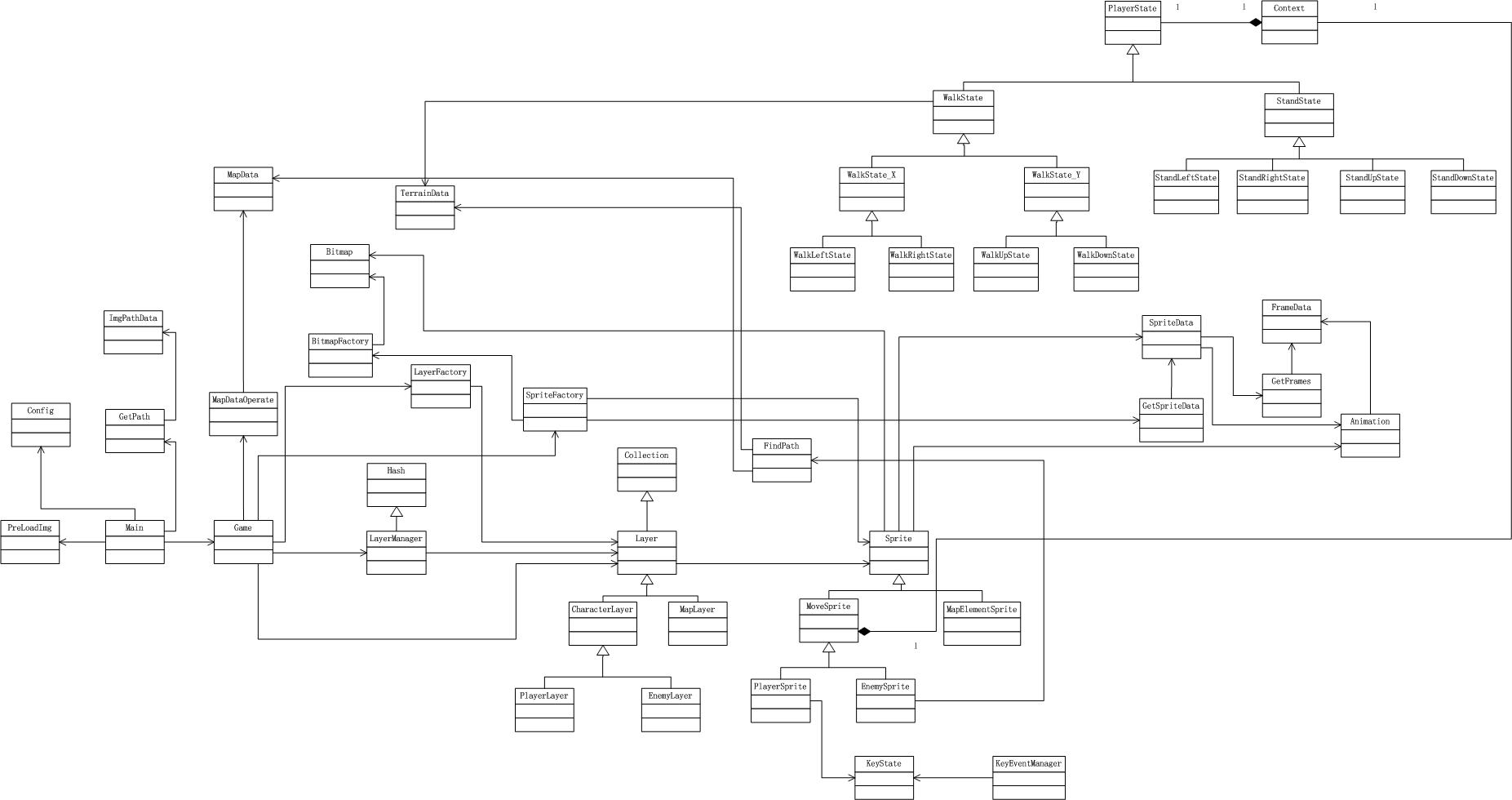
**本文最终领域模型**
[查看大图](//images0.cnblogs.com/blog/419321/201311/28133142-1c9a087654f84398b6adb0662bca59cd.jpg)
**高层划分**
# 新增包
- 算法包
FindPath
- 精灵抽象包
Sprite
- 哈希集合包
Hash
# 删除包
- 层管理实现包
经过本文重构后,去掉了PlayerLayerManager等子类,只保留了LayerManager类。因此去掉层管理实现包。
# 层、包

# 重构
## 将集合包重命名为数组集合包
“层”这个层级的集合包的命名太广泛了,应该具体化为数组集合包,这样才不至于与哈希集合包混淆。

# 将哈希集合包和数组集合包合并为集合包
哈希集合包与数组集合包都属于集合,因此应该合并为集合包,然后将集合包放到辅助逻辑层。

## 提出抽象包
### 分析
封闭性:
层抽象包、精灵抽象包位于同一个层面(抽象层面),会对同一种性质的变化共同封闭。
如精灵抽象类(精灵抽象包)发生变化,可能会引起层抽象类的变化。
重用性:
两者相互关联。
两者为抽象类,具有通用性。
可以一起被重用。
### 结论
因此,将层抽象包、精灵抽象包合并成抽象包,并放到辅助逻辑层。
## 将集合包也合并到抽象包中
抽象包与集合包有依赖关系,但实际上只是抽象包中的层抽象类与集合包有依赖,精灵抽象类与集合包没有管理,因此违反了共用重用原则CRP。
考虑到集合包也具有的通用性,将其也合并到抽象包中:

## 提出人物包、地图包
层和精灵都包含人物(精灵中为移动)、地图的概念,人物层与移动精灵、地图层与地图元素精灵联系紧密。
### 分析
封闭性:
层实现包与精灵实现包违反了共同封闭原则CCP。如地图发生变化时,只会引起地图层和地图元素精灵的变化,而不会引起人物层和移动精灵的变化。
重用性:
层实现包与精灵实现包中,人物层与地图层、移动精灵与地图元素精灵没有关联,因此违反了共同重用原则CRP。
因此,分离出人物包、地图包,并将层、精灵这两个层合并为实现层:

### 状态类放到哪
状态类与属于人物包的玩家精灵类和敌人精灵类紧密关联,因此应该放到人物包中。
### MoveSprite、CharacterLayer应不应该放到抽象包中
MoveSprite、CharacterLayer是抽象类,但是它们与具体的人物实现密切相关(因为它们是从人物实现类PlayerSprite和EnemySprite、PlayerLayer和EnemyLayer提取共同模式而形成的父类)。因此,它们应该放到人物实现包中。
# 本文最终层、包

# 对应领域模型
- 辅助操作层
控件包
PreLoadImg
- 配置包
Config
- 用户交互层
入口包
Main
- 业务逻辑层
辅助逻辑
工厂包
BitmapFactory、LayerFactory、SpriteFactory
- 事件管理包
KeyState、KeyEventManager
- 抽象包
Layer、Sprite、Hash、Collection
- 游戏主逻辑
主逻辑包
Game
- 层管理
层管理包
LayerManager
- 实现
人物实现包
PlayerLayer、MoveSprite、PlayerSprite、EnemySprite、CharacterLayer、PlayerLayer、EnemyLayer、Context、PlayerState、WalkState、StandState、WalkState_X、WalkState_Y、StandLeftState、StandRightState、StandUpState、StandDownState、WalkLeftState、WalkRightState、WalkUpState、WalkDownState
- 地图实现包
MapLayer、MapElementSprite
- 算法包
FindPath
- 动画包
Animation、GetSpriteData、SpriteData、GetFrames、FrameData
- 数据操作层
地图数据操作包
MapDataOperate
- 路径数据操作包
GetPath
- 图片数据操作包
Bitmap
- 数据层
地图包
MapData、TerrainData
- 图片路径包
ImgPathData
**演示地址**
[**演示地址**](http://yang222.s2.jutuo.net/Bomber/Index7)
**本文参考资料**
[A星算法](http://hi.baidu.com/wsapyoemdfacmqr/item/bdfb5c0a74c904d01ef0466d)
# 欢迎浏览上一篇博文:[炸弹人游戏开发系列(6):实现碰撞检测,设置移动步长](http://www.cnblogs.com/chaogex/p/3327097.html)
# 欢迎浏览下一篇博文:[炸弹人游戏开发系列(8):放炸弹](http://www.cnblogs.com/chaogex/p/3336783.html)