炸弹人游戏开发系列(8):放炸弹 | 杨元超的世界
前言
上文中我们加入了1个敌人,使用A*算法寻路。本文会给我们的炸弹人增加放炸弹的能力。
说明
名词解释
- xx类族 是指以xx为基类的继承树上的所有类。
本文目的
实现“放炸弹”功能
增加1个敌人,即一共有2个敌人追踪炸弹人
本文主要内容
回顾上文更新后的领域模型
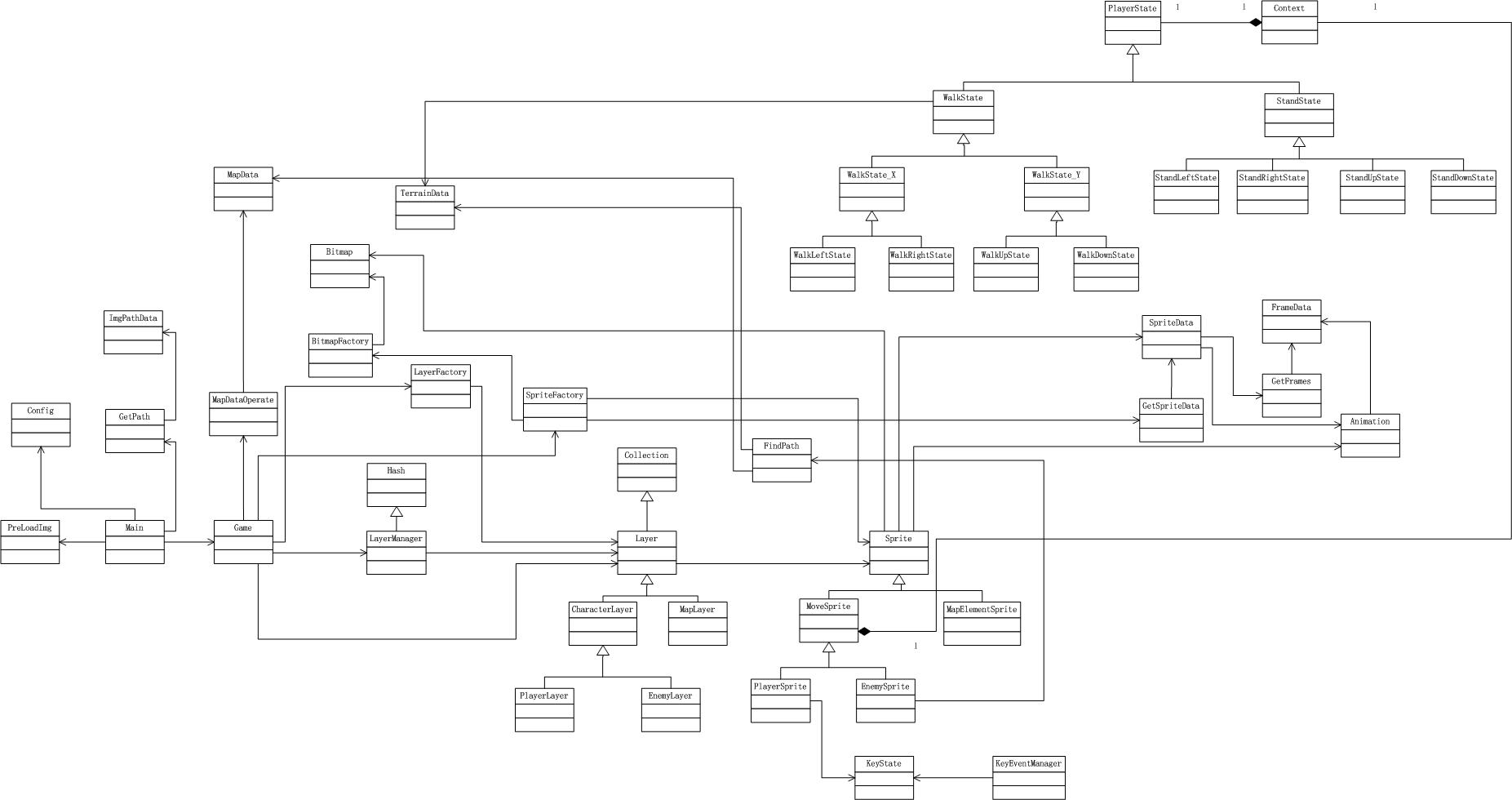
对领域模型进行思考
Layer类族的render方法改名为run
Layer的render方法负责统一调用Layer的方法,在概念上属于Actor,因此将其改名为run。
开发策略
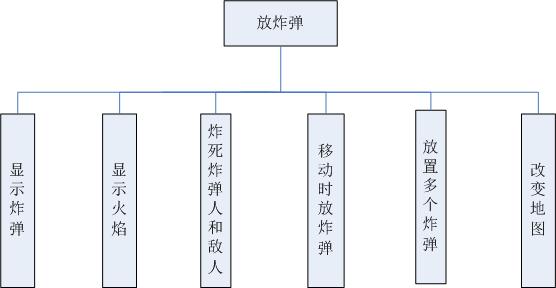
首先实现“放炸弹”功能。把这个功能分解成很多个子功能,一个一个地实现子功能。
然后再加入1个敌人。实际上就是在Game中往EnemyLayer集合中再加入一个EnemySprite实例,SpriteData增加第2个敌人的数据,SpriteFactory增加工厂方法createEnemy2。
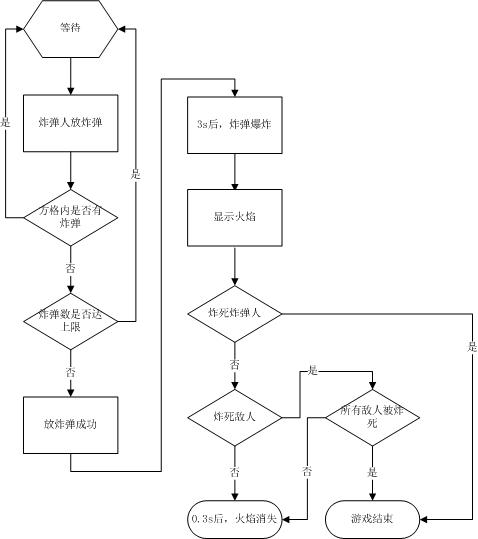
放炸弹流程
功能分解
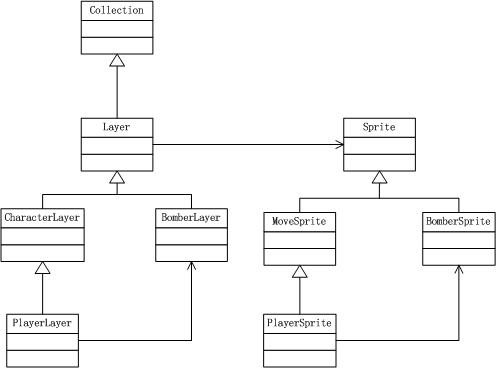
显示炸弹和火焰
显示炸弹
首先来实现“地图上显示炸弹”的功能,目前最多显示1个炸弹,玩家、敌人不能穿过炸弹。如果玩家处于炸弹方格中,则敌人会原地等待,玩家离开后,敌人继续追踪。
增加图片
增加图片bomb.png:

增加BomberSprite
增加炸弹精灵类BomberSprite:
(function () {
 var BombSprite = YYC.Class(Sprite, {
 Init: function (data, bitmap) {
 this.base(null, bitmap);
 },
 Public: {
 draw: function (context) {
 context.drawImage(this.bitmap.img, this.x, this.y, this.bitmap.width, this.bitmap.height);
 },
 clear: function (context) {
 context.clearRect(0, 0, bomberConfig.canvas.WIDTH, bomberConfig.canvas.HEIGHT);
 }
 }
 });

 window.BombSprite = BombSprite;
}());
增加BombLayer
在画布上增加炸弹层。同时增加对应的BombLayer类,它的集合元素为BombSprite类的实例。
将玩家、敌人画布Canvas的zIndex设为3,炸弹画布的zIndex设为1,使得,炸弹画布位于地图画布(zIndex为0)之上,玩家和敌人画布之下。
BomberLayer
(function () {
 var BombLayer = YYC.Class(Layer, {
 Private: {
 ___hasBomb: function () {
 return this.getChilds().length > 0;
 },
 ___render: function () {
 if (this.___hasBomb()) {
 this.clear();
 this.draw();
 }
 }
 },
 Public: {
 setCanvas: function () {
 this.P__canvas = document.getElementById("bombLayerCanvas");
 var css = {
 "position": "absolute",
 "top": bomberConfig.canvas.TOP,
 "left": bomberConfig.canvas.LEFT,
 "z-index": 1
 };

 $("#bombLayerCanvas").css(css);
 },
 draw: function () {
 this.P__iterator("draw", this.P__context);
 },
 clear: function () {
 this.P__iterator("clear", this.P__context);
 },
 run: function () {
 this.___render();
 }
 }
 });

 window.BombLayer = BombLayer;
}());
增加工厂方法
SpriteFactory增加创建炸弹精灵类实例的工厂方法。
LyaerFactory增加创建炸弹层实例的工厂方法。
SpriteFactory
 createBomb: function (playerSprite) {
 return new BombSprite(playerSprite, bitmapFactory.createBitmap({ img: window.imgLoader.get("bomb"), width: bomberConfig.WIDTH, height: bomberConfig.HEIGHT }));
 },
LayerFactory
 createBomb: function () {
 return new BombLayer();
 },
修改PlayerSprite
PlayerSprite增加createBomb方法:
 bombNum: 0,
...
 createBomb: function () {
 if (this.moving || this.bombNum === 1) {
 return null;
 }

 var bomb = spriteFactory.createBomb();

 bomb.x = this.x;
 bomb.y = this.y;

 this.bombNum += 1;

 return bomb;
 }
修改PlayerLayer
PlayerLayer增加getBomb和createAndAddBomb方法:
 bombLayer: null,
...
 getBomb: function (bombLayer) {
 this.bombLayer = bombLayer;
 },
 createAndAddBomb: function () {
 var bomb = this.getChildAt(0).createBomb();
 if (!bomb) {
 return false;
 }
 this.bombLayer.appendChild(bomb);
 }
监听空格键
空格键用于炸弹人放炸弹。
KeyCodeMap增加空格键枚举值:
 var keyCodeMap = {
 Left: 65, // A键
 Right: 68, // D键
 Down: 83, // S键
 Up: 87, // W键
 Space: 32 //空格键
 };

 keyState[keyCodeMap.A] = false;
 keyState[keyCodeMap.D] = false;
 keyState[keyCodeMap.W] = false;
 keyState[keyCodeMap.S] = false;
 keyState[keyCodeMap.Space] = false;
然后在PlayerLayer中对KeyState的空格键进行判定:
 run: function () {
 if (keyState[keyCodeMap.Space]) {
 this.createAndAddBomb();
 keyState[keyCodeMap.Space] = false;
 }
 this.base();
 }
领域模型
显示火焰
火力范围设为1格,分为上下左右四个方向。地图的墙对火焰有阻断作用。
增加图片
爆炸中心为图片boom.png:

火焰为图片explode.png:

增加FireSprite
增加火焰精灵类。
增加FireLayer
在画布上增加火焰画布,同时对应的FireLayer类。
该画布位于地图和炸弹画布之上,玩家和敌人画布之下。
增加工厂方法
SpriteFactory增加创建爆炸中心火焰精灵类实例和创建火焰精灵类实例的工厂方法。
LayerFactory增加创建火焰层实例的工厂方法。
领域模型
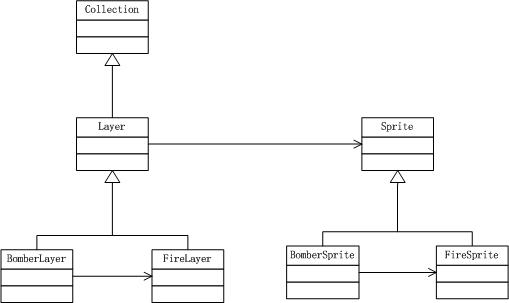
相关代码
Sprite


(function () {
 var Sprite = YYC.AClass({
 Init: function (data, bitmap) {
 this.bitmap = bitmap;

 if (data) {
 this.x = data.x;
 this.y = data.y;

 this.defaultAnimId = data.defaultAnimId;
 this.anims = data.anims;
 }
 },
 Private: {
 //更新帧动画
 _updateFrame: function (deltaTime) {
 if (this.currentAnim) {
 this.currentAnim.update(deltaTime);
 }
 }
 },
 Public: {
 bitmap: null,

 //精灵的坐标
 x: 0,
 y: 0,

 //精灵包含的所有 Animation 集合. Object类型, 数据存放方式为" id : animation ".
 anims: null,
 //默认的Animation的Id , string类型
 defaultAnimId: null,

 //当前的Animation.
 currentAnim: null,

 //设置当前Animation, 参数为Animation的id, String类型
 setAnim: function (animId) {
 this.currentAnim = this.anims[animId];
 },
 //重置当前帧
 resetCurrentFrame: function (index) {
 this.currentAnim && this.currentAnim.setCurrentFrame(index);
 },
 //取得精灵的碰撞区域,
 getCollideRect: function () {
 return {
 x1: this.x,
 y1: this.y,
 x2: this.x + this.bitmap.width,
 y2: this.y + this.bitmap.height
 }
 },
 Virtual: {
 //初始化方法
 init: function () {
 //设置当前Animation
 this.setAnim(this.defaultAnimId);
 },
 // 更新精灵当前状态.
 update: function (deltaTime) {
 this._updateFrame(deltaTime);
 },
 //获得坐标对应的方格坐标
 getCellPosition: function (x, y) {
 return {
 x: x / bomberConfig.WIDTH,
 y: y / bomberConfig.HEIGHT
 }
 },
 draw: function (context) {
 context.drawImage(this.bitmap.img, this.x, this.y, this.bitmap.width, this.bitmap.height);
 },
 clear: function (context) {
 //直接清空画布区域
 context.clearRect(0, 0, bomberConfig.canvas.WIDTH, bomberConfig.canvas.HEIGHT);
 }
 }
 },
 Abstract: {
 }
 });

 window.Sprite = Sprite;
}());
View Code
FireSprite
(function () {
 var FireSprite = YYC.Class(Sprite, {
 Init: function (data, bitmap) {
 this.base(null, bitmap);
 }
 });

 window.FireSprite = FireSprite;
}());
BombSprite
(function () {
 var BombSprite = YYC.Class(Sprite, {
 Init: function (playerSprite, bitmap) {
 this.playerSprite = playerSprite;

 this.base(null, bitmap);
 },
 Protected: {
 },
 Private: {
 __createFire: function () {
 var fires = [],

 up = null,
 down = null,
 left = null,
 right = null;

 this.__createCenter(fires);
 this.__createUp(fires);
 this.__createDown(fires);
 this.__createLeft(fires);
 this.__createRight(fires);

 return fires;
 },
 __createCenter: function (fires) {
 var center = spriteFactory.createExplode();

 center.x = this.x;
 center.y = this.y;
 fires.push(center);
 },
 __createUp: function (fires) {
 this.__createOneDir(fires, this.x, this.y - bomberConfig.HEIGHT);
 },
 __createDown: function (fires) {
 this.__createOneDir(fires, this.x, this.y + bomberConfig.HEIGHT);
 },
 __createLeft: function (fires) {
 this.__createOneDir(fires, this.x - bomberConfig.WIDTH, this.y);
 },
 __createRight: function (fires) {
 this.__createOneDir(fires, this.x + bomberConfig.WIDTH, this.y);
 },
 __createOneDir: function (fires, x, y) {
 var fire = null;
 var position = this.getCellPosition(x, y);

 if (this.__isNotBorder(position) && this.__isGround(position)) {
 fire = spriteFactory.createFire();
 fire.x = x;
 fire.y = y;
 fires.push(fire);
 }
 },
 __isNotBorder: function (position) {
 if (position.x = window.mapData[0].length || position.y >= window.mapData.length) {
 return false;
 }

 return true;
 },
 __isGround: function (position) {
 return window.mapData[position.y][position.x] === window.bomberConfig.map.type.GROUND;
 },
 __changeTerrainData: function () {
 var pass = bomberConfig.map.terrain.pass,
 position = this.getCellPosition(this.x, this.y);

 window.terrainData[position.y][position.x] = pass;
 }
 },
 Public: {
 playerSprite: null,

 explode: function () {
 this.playerSprite.bombNum -= 1;
 this.__changeTerrainData();
 return this.__createFire();
 }
 }
 });

 window.BombSprite = BombSprite;
}());
View Code
PlayerSprite
(function () {
 var PlayerSprite = YYC.Class(MoveSprite, {
 Init: function (data, bitmap) {
 this.base(data, bitmap);

 this.P__context = new Context(this);
 },
 Private: {
 __allKeyUp: function () {
 return window.keyState[keyCodeMap.A] === false && window.keyState[keyCodeMap.D] === false
 && window.keyState[keyCodeMap.W] === false && window.keyState[keyCodeMap.S] === false;
 },
 __judgeAndSetDir: function () {
 if (window.keyState[keyCodeMap.A] === true) {
 this.P__context.walkLeft();
 }
 else if (window.keyState[keyCodeMap.D] === true) {
 this.P__context.walkRight();
 }
 else if (window.keyState[keyCodeMap.W] === true) {
 this.P__context.walkUp();
 }
 else if (window.keyState[keyCodeMap.S] === true) {
 this.P__context.walkDown();
 }
 },
 __changeTerrainData: function () {
 var stop = bomberConfig.map.terrain.stop,
 position = this.getCurrentCellPosition();

 window.terrainData[position.y][position.x] = stop;
 }
 },
 Public: {
 //已放置的炸弹数
 bombNum: 0,

 move: function () {
 this.P__context.move();
 },
 setDir: function () {
 if (this.moving) {
 return;
 }

 if (this.__allKeyUp()) {
 this.P__context.stand();
 }
 else {
 this.__judgeAndSetDir();
 }
 },
 createBomb: function () {
 if (this.moving || this.bombNum === 1) {
 return null;
 }

 var bomb = spriteFactory.createBomb(this);

 bomb.x = this.x;
 bomb.y = this.y;

 this.bombNum += 1;

 this.__changeTerrainData();

 return bomb;
 }
 }
 });

 window.PlayerSprite = PlayerSprite;
}());
View Code
Layer
//层类(抽象类)
//职责:
////负责层内组件的统一draw
(function () {
 var Layer = YYC.AClass(Collection, {
 Init: function () {
 },
 Private: {
 __state: bomberConfig.layer.state.CHANGE, //默认为change

 __getContext: function () {
 this.P__context = this.P__canvas.getContext("2d");
 }
 },
 Protected: {
 //*共用的变量(可读、写)

 P__canvas: null,
 P__context: null,

 //*共用的方法(可读)

 P__isChange: function () {
 return this.__state === bomberConfig.layer.state.CHANGE;
 },
 P__isNormal: function () {
 return this.__state === bomberConfig.layer.state.NORMAL;
 },
 P__setStateNormal: function () {
 this.__state = bomberConfig.layer.state.NORMAL;
 },
 P__setStateChange: function () {
 this.__state = bomberConfig.layer.state.CHANGE;
 },
 P__iterator: function (handler) {
 var args = Array.prototype.slice.call(arguments, 1),
 nextElement = null;

 while (this.hasNext()) {
 nextElement = this.next();
 nextElement[handler].apply(nextElement, args); //要指向nextElement
 }
 this.resetCursor();
 },
 P__render: function () {
 if (this.P__isChange()) {
 this.clear();
 this.draw();
 this.P__setStateNormal();
 }
 }
 },
 Public: {
 addElements: function (elements) {
 this.appendChilds(elements);
 },
 Virtual: {
 init: function () {
 this.__getContext();
 },
 //更改状态
 change: function () {
 this.__state = bomberConfig.layer.state.CHANGE;
 }
 }
 },
 Abstract: {
 setCanvas: function () {
 },
 clear: function () {
 },
 //统一绘制
 draw: function () { },
 //游戏主线程调用的函数
 run: function () { }
 }
 });

 window.Layer = Layer;
}());
View Code
FireLayer
(function () {
 var FireLayer = YYC.Class(Layer, {
 Private: {
 ___hasFire: function(){
 return this.getChilds().length > 0;
 }
 },
 Public: {
 setCanvas: function () {
 this.P__canvas = document.getElementById("fireLayerCanvas");
 var css = {
 "position": "absolute",
 "top": bomberConfig.canvas.TOP,
 "left": bomberConfig.canvas.LEFT,

 "z-index": 2
 };

 $("#fireLayerCanvas").css(css);
 },
 draw: function () {
 this.P__iterator("draw", this.P__context);
 },
 clear: function () {
 this.P__iterator("clear", this.P__context);
 },
 change: function () {
 if (this.___hasFire()) {
 this.base();
 }
 },
 run: function () {
 this.P__render();
 }
 }
 });

 window.FireLayer = FireLayer;
}());
BombLayer
(function () {
 var BombLayer = YYC.Class(Layer, {
 Private: {
 ___hasBomb: function(){
 return this.getChilds().length > 0;
 },
 ___removeBomb: function (bomb) {
 //*注意顺序!

 this.clear();
 this.remove(bomb);
 },
 ___removeAllFire: function () {
 //*注意顺序!

 this.fireLayer.clear();
 this.fireLayer.removeAll();
 }
 },
 Public: {
 fireLayer: null,

 setCanvas: function () {
 this.P__canvas = document.getElementById("bombLayerCanvas");
 var css = {
 "position": "absolute",
 "top": bomberConfig.canvas.TOP,
 "left": bomberConfig.canvas.LEFT,
 "z-index": 1
 };

 $("#bombLayerCanvas").css(css);
 },
 draw: function () {
 this.P__iterator("draw", this.P__context);
 },
 clear: function () {
 this.P__iterator("clear", this.P__context);
 },
 getFire: function (fireLayer) {
 this.fireLayer = fireLayer;
 },
 explode: function (bomb) {
 var self = this;

 this.fireLayer.addElements(bomb.explode());
 this.___removeBomb(bomb);
 //定时清空fireLayer(火焰消失)
 setTimeout(function () {
 self.___removeAllFire();
 }, 300);
 },
 change: function(){
 if (this.___hasBomb()) {
 this.base();
 }
 },
 run: function () {
 this.P__render();
 }
 }
 });

 window.BombLayer = BombLayer;
}());
SpriteFactory
 createFire: function () {
 return new FireSprite(null, bitmapFactory.createBitmap({ img: window.imgLoader.get("fire"), width: bomberConfig.WIDTH, height: bomberConfig.HEIGHT }));
 },
 createExplode: function () {
 return new FireSprite(null, bitmapFactory.createBitmap({ img: window.imgLoader.get("explode"), width: bomberConfig.WIDTH, height: bomberConfig.HEIGHT }));
 }
LayerFactory
 createFire: function () {
 return new FireLayer();
 }
“显示炸弹和火焰”演示
使用观察者模式
观察者模式介绍
应用场景
墙被炸掉后,会变成空地。
实现思路
Maplayer的changeSpriteImg负责更改地图图片,BombSprite的explode负责处理爆炸逻辑。
需要在explode中调用Maplayer的changeSpriteImg。
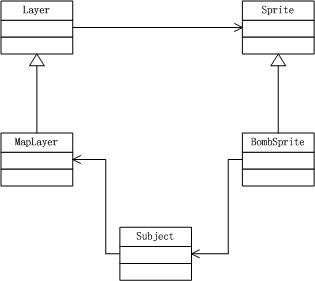
因此,决定在Game中订阅Maplayer的changeSpriteImg方法,然后在BombSprite的explode方法中发布。
为什么此处用观察者模式
因为MapLayer的Layer类族在BombSprite的Sprite类族的上层,我不希望下层BombSprite与上层MapLayer耦合。
因此,采用观察者模式来解除两者的耦合。
领域模型
使用观察模式前
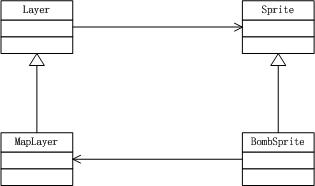
使用观察模式后
相关代码
Subject
(function () {
 if (!Array.prototype.forEach) {
 Array.prototype.forEach = function (fn, thisObj) {
 var scope = thisObj || window;
 for (var i = 0, j = this.length; i 订阅
 window.observer.subscribe(this.layerManager.getLayer("mapLayer"), this.layerManager.getLayer("mapLayer").changeSpriteImg);
 },
重构
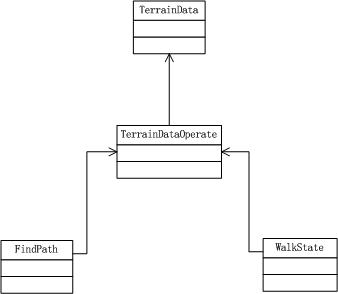
增加TerrainDataOperate
增加TerrainData地形数据操作类TerrainDataOperate
领域模型
重构前
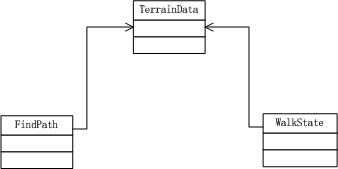
重构后
相关代码
TerrainDataOperate
(function () {
 var terrainDataOperate = {
 getTerrainData: function () {
 return YYC.Tool.array.clone(window.terrainData);
 },
 setTerrainData: function (x, y, data) {
 window.terrainData[y][x] = data;
 }
 };

 window.terrainDataOperate = terrainDataOperate;
}());
增加火力范围
将范围从1格改为2格,方便演示游戏。
增加游戏全局状态GameState
在Game的run方法中,需要判断敌人是否抓住了玩家(是否与玩家碰撞):
 run: function () {
 if (this.layerManager.getLayer("enemyLayer").collideWidthPlayer()) {
 YYC.Tool.asyn.clearAllTimer(this.mainLoop);
 alert("Game Over!");
 return;
 }
...
 }
这里注意到,Game需要知道EnemyLayer的collideWidthPlayer方法:
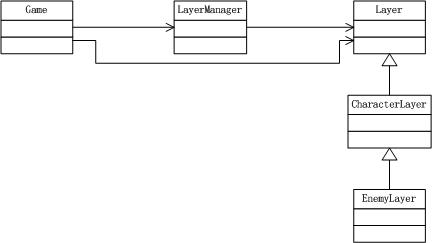
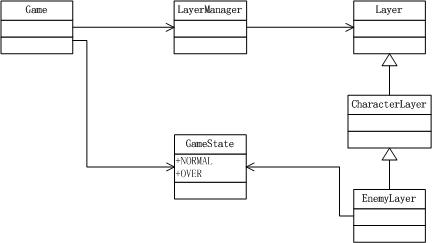
但Game类只应该知道LayerManager,而不应该知道Layer(见“炸弹人游戏开发系列(1):准备工作”中的概念层次结构)。
因此,增加游戏全局状态GameState,在Game的run判断GameState,然后把与炸弹人的碰撞检测的任务放到EnemyLayer的run方法中:
重构后相关代码
Config
 game: {
 state: {
 NORAML: 1,
 OVER: 2
 }
 },
Game
 //游戏全局状态
 window.gameState = window.bomberConfig.game.state.NORMAL;
...
 run: function () {
 if (window.gameState === window.bomberConfig.game.state.OVER) {
 this.gameOver();
 return;
 }
...
 }
 ,
 gameOver: function () {
 YYC.Tool.asyn.clearAllTimer(this.mainLoop);
 alert("Game Over!");
 }
EnemyLayer
 run: function () {
 if (this.collideWidthPlayer()) {
 window.gameState = window.bomberConfig.game.state.OVER;
 return;
 }
...
炸弹可以炸死炸弹人和敌人
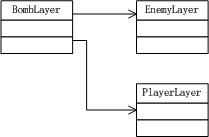
在炸弹爆炸时,判断与炸弹人、敌人是否碰撞并进行相应处理。
领域模型
相关代码
BombLayer
___collideFireWithPlayer: function (bomb) {
if (bomb.collideFireWithCharacter(this.playerLayer.getChildAt(0))) {
window.gameState = window.bomberConfig.game.state.OVER;
}
},
___collideFireWithEnemy: function (bomb) {
var i = 0,
len = 0,
enemySprites = this.enemyLayer.getChilds();
for (i = 0, len = enemySprites.length ; i
**移动时放炸弹**
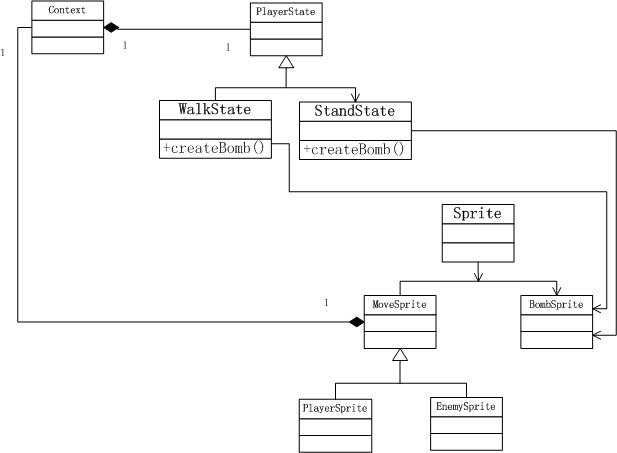
因为炸弹人移动时,根据炸弹人状态的不同,炸弹放置的坐标策略也不同(即如果炸弹人往上走,则炸弹放在炸弹人所在方格的上面相邻方格;如果往左走,则炸弹放在炸弹人所在方格的左侧相邻方格)。所以将PlayerSprite的createBomb方法委托给状态类处理。具体来说,就是把createBomb方法移到状态类的WalkState类和Stand类中来分别处理。
# 领域模型
# 分析
因为PlayerSprite、EnemySprite都使用了状态类,因此两者都与BombSprite耦合。但只有PlayerSprite需要使用createBomb方法,EnemySprite并不需要使用该方法。所以此处违反了迪米特法则。
目前这种情况在可以接受的范围之内。如果在后面的开发中EnemySprite与BombSprite耦合得很严重,再来考虑解耦。
**放置多个炸弹**
可以最多放3个炸弹,炸弹爆炸时会引爆在火力范围内的炸弹。
# 不能在一个方格叠加多个炸弹
在状态类WalkState类族、StandState类族的createBomb中判断方格是否有炸弹(判断地形数据TerrainData来实现)。
**改变地图**
# 炸掉墙
如果墙处于火焰范围内,则修改MapData,将墙的图片换成空地图片,同时对应修改TerrainData,将墙所在的方格设成可通过。
# 刷新地图
在炸掉墙后,在BombLayer中需要调用MapLayer的setStateChange方法,将MapLayer的state设为change,从而能够在游戏的下一个主循环中,刷新地图,从而显示为空地。
## 领域模型

## 相关代码
BombLayer
___mapChange: function (mapChange) { if (mapChange) { this.mapLayer.setStateChange(); } }
**小结**


现在我们就完成了“放炸弹”的功能,来看下成果吧~


# “放炸弹”演示


[演示地址](http://yang222.s2.jutuo.net/Bomber/Index8_2)


# 相关代码


FireSprite
(function () { var FireSprite = YYC.Class(Sprite, { Init: function (data, bitmap) { this.base(null, bitmap); } });
window.FireSprite = FireSprite; }());
FireLayer

(function () { var FireLayer = YYC.Class(Layer, { Private: { ___hasFire: function(){ return this.getChilds().length > 0; } }, Public: { setCanvas: function () { this.P__canvas = document.getElementById("fireLayerCanvas"); var css = { "position": "absolute", "top": bomberConfig.canvas.TOP, "left": bomberConfig.canvas.LEFT, "z-index": 2 };
$("#fireLayerCanvas").css(css); }, draw: function () { this.P__iterator("draw", this.P__context); }, clear: function () { this.P__iterator("clear", this.P__context); }, change: function () { if (this.___hasFire()) { this.setStateChange(); } }, run: function () { this.P__render(); } } });
window.FireLayer = FireLayer; }());
View Code
PlayerSprite

(function () { var PlayerSprite = YYC.Class(MoveSprite, { Init: function (data, bitmap) { this.base(data, bitmap);
this.P__context = new Context(this); }, Private: { __allKeyUp: function () { return window.keyState[keyCodeMap.A] === false && window.keyState[keyCodeMap.D] === false && window.keyState[keyCodeMap.W] === false && window.keyState[keyCodeMap.S] === false; }, __judgeAndSetDir: function () { if (window.keyState[keyCodeMap.A] === true) { this.P__context.walkLeft(); } else if (window.keyState[keyCodeMap.D] === true) { this.P__context.walkRight(); } else if (window.keyState[keyCodeMap.W] === true) { this.P__context.walkUp(); } else if (window.keyState[keyCodeMap.S] === true) { this.P__context.walkDown(); } }, __changeTerrainData: function () { var stop = bomberConfig.map.terrain.stop, position = this.getCurrentCellPosition();
terrainDataOperate.setTerrainData(position.x, position.y, stop); } }, Public: { //已放置的炸弹数 bombNum: 0,
move: function () { this.P__context.move(); }, setDir: function () { if (this.moving) { return; }
if (this.__allKeyUp()) { this.P__context.stand(); } else { this.__judgeAndSetDir(); } }, createBomb: function () { if (this.bombNum === 3) { return null; }
return this.P__context.createBomb(); } } });
window.PlayerSprite = PlayerSprite; }());
View Code
BomberSprite

(function () { var BombSprite = YYC.Class(Sprite, { Init: function (playerSprite, bitmap) { this.playerSprite = playerSprite;
this.base(null, bitmap); }, Protected: { }, Private: { //返回火焰范围 //返回顺序为[center、[up]、[down]、[left]、[right]] __getFireAllRange: function () {
return [ { x: this.x, y: this.y }, [ { x: this.x, y: this.y - bomberConfig.HEIGHT }, { x: this.x, y: this.y - bomberConfig.HEIGHT * 2 } ], [ { x: this.x, y: this.y + bomberConfig.HEIGHT }, { x: this.x, y: this.y + bomberConfig.HEIGHT * 2 } ], [ { x: this.x - bomberConfig.WIDTH, y: this.y }, { x: this.x - bomberConfig.WIDTH * 2, y: this.y } ], [ { x: this.x + bomberConfig.WIDTH, y: this.y }, { x: this.x + bomberConfig.WIDTH * 2, y: this.y } ] ]; }, __getCenterEffectiveRange: function (effectiveRange, center) { effectiveRange.center = { x: center.x, y: center.y }; }, __getFourDirEffectiveRange: function (effectiveRange, allRange) { var i = 0, j = 0, len1 = 0, len2 = 0, firePos = null, cellPos = null, groundRange = [], wallRange = [];
for (i = 0, len1 = allRange.length; i = window.mapData[0].length || position.y >= window.mapData.length) { return false; }
return true; }, __isGround: function (position) { return window.mapDataOperate.getMapData()[position.y][position.x] === window.bomberConfig.map.type.GROUND; }, __bombPass: function () { var pass = bomberConfig.map.terrain.pass, position = this.getCellPosition(this.x, this.y);
terrainDataOperate.setTerrainData(position.x, position.y, pass); }, __destroyWall: function (effectiveRange) { var i = 0, len = 0, mapChange = false, wallRange = effectiveRange.wallRange, cellPos = null, ground = bomberConfig.map.type.GROUND, groundImg = window.imgLoader.get("ground"), wall = bomberConfig.map.type.WALL, pass = bomberConfig.map.terrain.pass, stop = bomberConfig.map.terrain.stop;
for (i = 0, len = wallRange.length; i 发布 //调用mapLayer.changeSpriteImg,改变地图层对应精灵类的img对象 window.observer.publishAll(null, cellPos.x, cellPos.y, groundImg); if (!mapChange) { mapChange = true; } }
return mapChange; }, __isWall: function (position) { return window.mapDataOperate.getMapData()[position.y][position.x] === window.bomberConfig.map.type.WALL; }, __isInEffectiveRange: function (effectiveRange) { var range = null;
range = effectiveRange.groundRange.concat(effectiveRange.wallRange); range.push(effectiveRange.center);
if (this.__isInRange(range)) { return true; } else { return false; } }, __isInRange: function (range) { var i = 0, len = 0;
for (i = 0, len = range.length; i 0; }, ___removeBomb: function (bomb) { //*注意顺序!
this.clear(bomb); this.remove(bomb); }, ___removeAllFire: function () { //*注意顺序!
this.fireLayer.clear(); this.fireLayer.removeAll(); }, ___removeEnemy: function (enemy) { //*注意顺序!
this.enemyLayer.clear(enemy); this.enemyLayer.remove(enemy); }, ___mapChange: function (mapChange) { if (mapChange) { this.mapLayer.setStateChange(); } }, ___collideFireWithPlayer: function (bomb) { if (bomb.collideFireWithCharacter(this.playerLayer.getChildAt(0))) { window.gameState = window.bomberConfig.game.state.OVER; } }, ___collideFireWithEnemy: function (bomb) { var i = 0, len = 0, enemySprites = this.enemyLayer.getChilds();
for (i = 0, len = enemySprites.length ; i
加入1个敌人
往EnemyLayer集合中再加入一个EnemySprite实例,SpriteData增加第2个敌人的数据,SpriteFactory增加工厂方法createEnemy2。
相关代码
Game
 _createEnemyLayerElement: function () {
 var element = [],
 enemy = spriteFactory.createEnemy(),
 enemy2 = spriteFactory.createEnemy2();

 enemy.init();
 enemy2.init();

 element.push(enemy);
 element.push(enemy2);

 return element;
 },
SpriteData
enemy2: {
 //初始坐标
 x: bomberConfig.WIDTH * 10,
 //x: 0,
 y: bomberConfig.HEIGHT * 10,
 //定义sprite走路速度的绝对值
 walkSpeed: bomberConfig.enemy.speed.NORMAL,

 //速度
 speedX: 1,
 speedY: 1,

 minX: 0,
 maxX: bomberConfig.canvas.WIDTH - bomberConfig.player.IMGWIDTH,
 minY: 0,
 maxY: bomberConfig.canvas.HEIGHT - bomberConfig.player.IMGHEIGHT,

 defaultAnimId: "stand_left",

 anims: {
 "stand_right": new Animation(getFrames("enemy", "stand_right")),
 "stand_left": new Animation(getFrames("enemy", "stand_left")),
 "stand_down": new Animation(getFrames("enemy", "stand_down")),
 "stand_up": new Animation(getFrames("enemy", "stand_up")),
 "walk_up": new Animation(getFrames("enemy", "walk_up")),
 "walk_down": new Animation(getFrames("enemy", "walk_down")),
 "walk_right": new Animation(getFrames("enemy", "walk_right")),
 "walk_left": new Animation(getFrames("enemy", "walk_left"))
 }
}
SpriteFactory
 createEnemy2: function () {
 return new EnemySprite(getSpriteData("enemy2"), bitmapFactory.createBitmap({ img: window.imgLoader.get("enemy"), width: bomberConfig.player.IMGWIDTH, height: bomberConfig.player.IMGHEIGHT }));
 },
炸死所有敌人后,提示游戏胜利
GameState增加WIN枚举值。在BombLayer中判断是否将敌人都炸死了,如果都炸死了则设置GameState为WIN。在Game中判断GameState,调用相应的方法。
领域模型

相关代码
BombLayer
___collideFireWithEnemy: function (bomb) {
var i = 0,
len = 0,
enemySprites = this.enemyLayer.getChilds();
for (i = 0, len = enemySprites.length ; i
**本文最终领域模型**
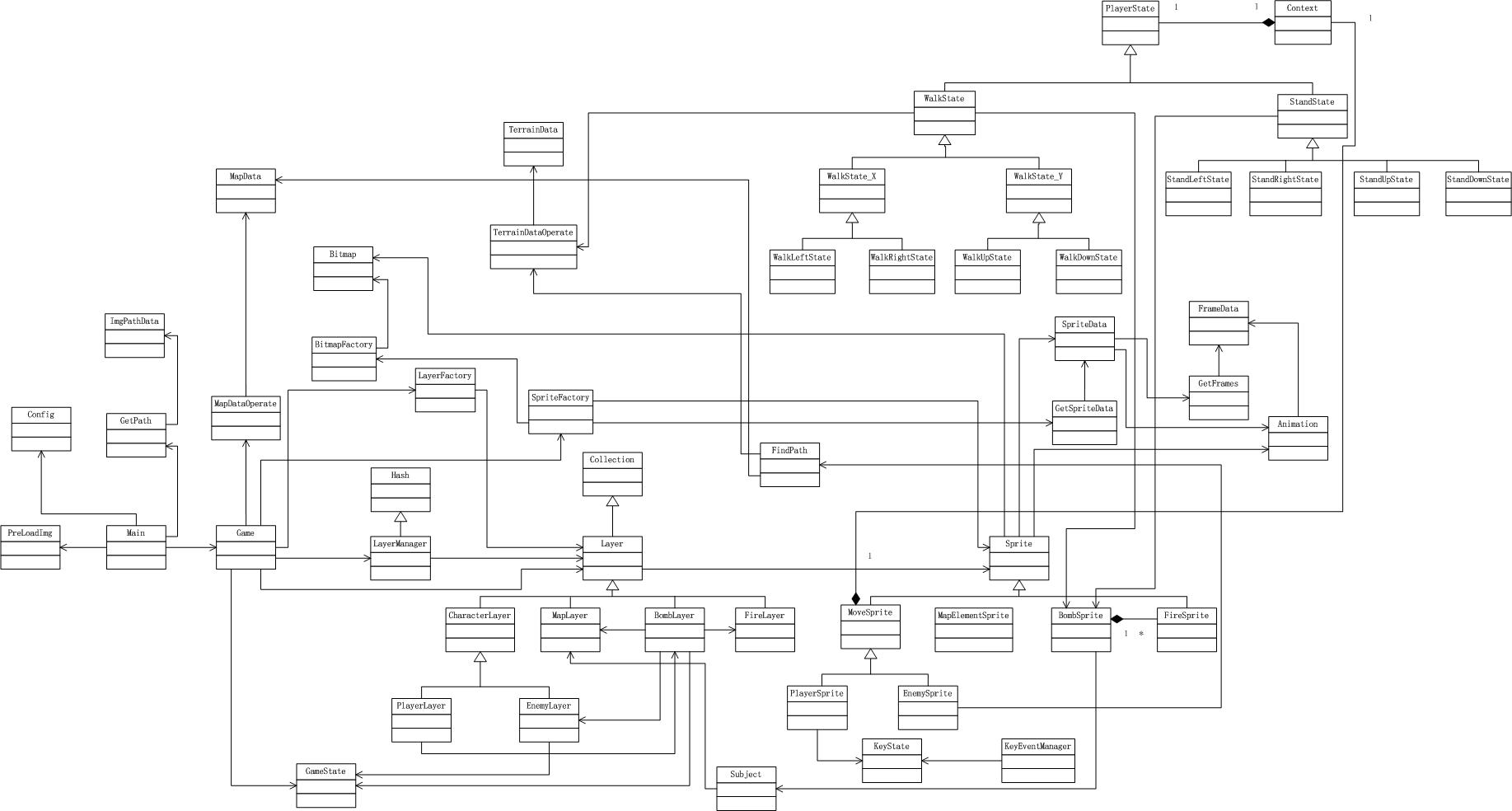
[查看大图](//images0.cnblogs.com/blog/419321/201311/28133034-427a57439c904d6fa719af30f2323ce9.jpg)
**高层划分**
# 炸弹层和炸弹精灵、火焰层和火焰精灵应该放到哪个包?
炸弹层和玩家层、炸弹精灵和玩家精灵紧密关联,火焰层和火焰精灵与炸弹层和炸弹精灵紧密关联,因此将炸弹层和炸弹精灵、火焰层和火焰精灵移到人物包中。
# 新增包
- 全局包
GameState
- 观察者模式包
Subject
- 炸弹实现包
BombSprite、FireSprite、BombLayer、FireLayer
# 层、包
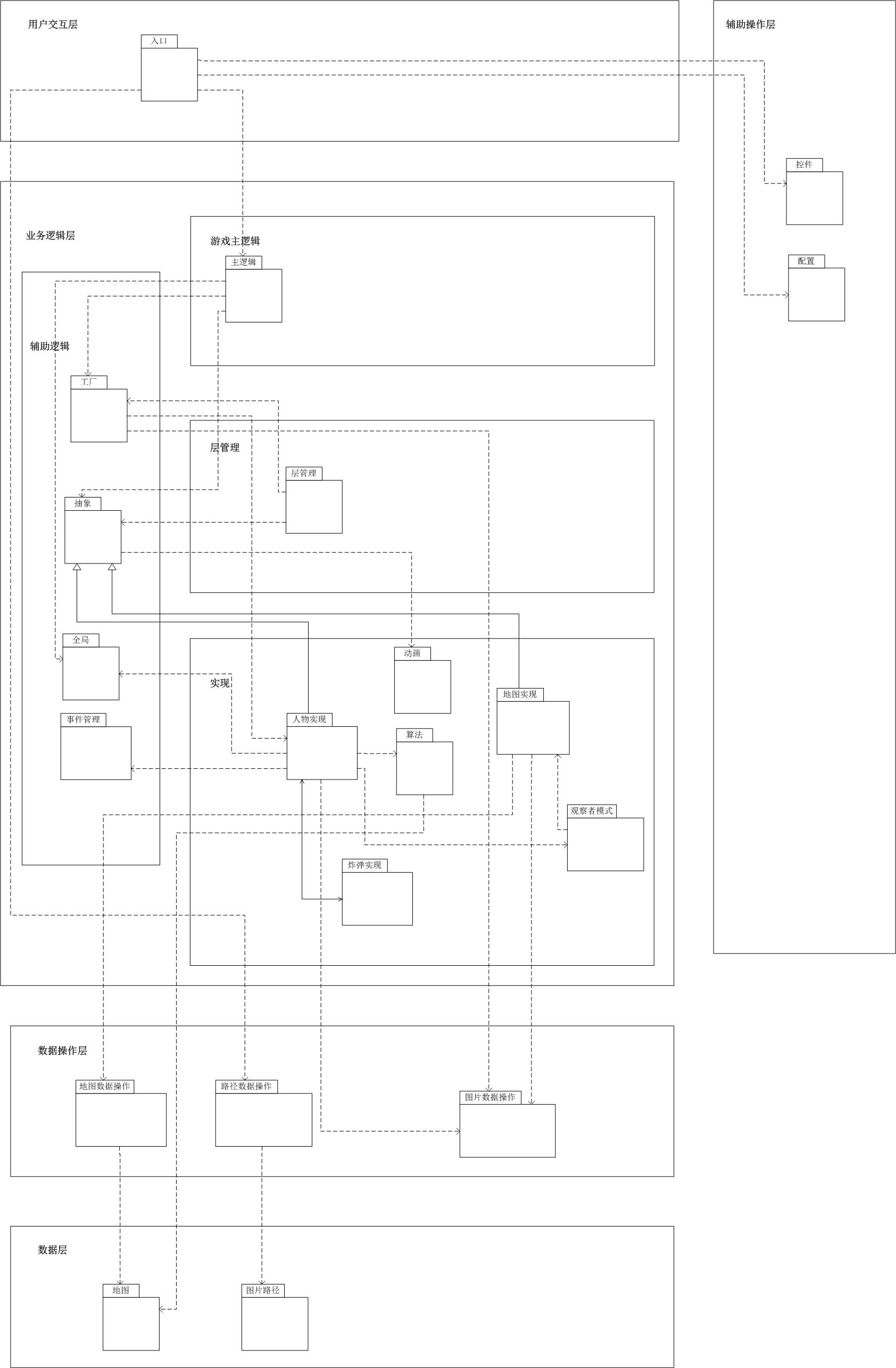
# 对应领域模型
- 辅助操作层
控件包
PreLoadImg
- 配置包
Config
- 用户交互层
入口包
Main
- 业务逻辑层
辅助逻辑
工厂包
BitmapFactory、LayerFactory、SpriteFactory
- 事件管理包
KeyState、KeyEventManager
- 抽象包
Layer、Sprite、Hash、Collection
- 全局包
GameState
- 游戏主逻辑
主逻辑包
Game
- 层管理
层管理包
LayerManager
- 实现
人物实现包
PlayerLayer、MoveSprite、PlayerSprite、EnemySprite、CharacterLayer、PlayerLayer、EnemyLayer、Context、PlayerState、WalkState、StandState、WalkState_X、WalkState_Y、StandLeftState、StandRightState、StandUpState、StandDownState、WalkLeftState、WalkRightState、WalkUpState、WalkDownState
- 炸弹实现包
BombSprite、FireSprite、BombLayer、FireLayer
- 地图实现包
MapLayer、MapElementSprite
- 算法包
FindPath
- 动画包
Animation、GetSpriteData、SpriteData、GetFrames、FrameData
- 观察者模式包
Subject
- 数据操作层
地图数据操作包
MapDataOperate、TerrainDataOperate
- 路径数据操作包
GetPath
- 图片数据操作包
Bitmap
- 数据层
地图包
MapData、TerrainData
- 图片路径包
ImgPathData
**本文参考资料**
[深入理解JavaScript系列(32):设计模式之观察者模式](http://www.cnblogs.com/TomXu/archive/2012/03/02/2355128.html)
《设计模式之禅》
# 欢迎浏览上一篇博文:[炸弹人游戏开发系列(7):加入敌人,使用A*算法寻路](http://www.cnblogs.com/chaogex/p/3334223.html)
# 欢迎浏览下一篇博文:[炸弹人游戏开发系列(9):总结 ](http://www.cnblogs.com/chaogex/p/3343198.html)